Bauhn APB27GMC-0725 Manual

Bauhn Ikke kategoriseret APB27GMC-0725

Læs gratis den danske manual til Bauhn APB27GMC-0725 (2 sider) i kategorien Ikke kategoriseret. Denne vejledning er vurderet som hjælpsom af 26 personer og har en gennemsnitlig bedømmelse på 4.3 stjerner ud af 13.5 anmeldelser. Har du et spørgsmål om Bauhn APB27GMC-0725, eller vil du spørge andre brugere om produktet?

Side 1/2
Cannot charge
device
Make sure the USB cable is plugged into the output port; unplug the USB cable
and try again.
Try another USB cable and/or USB port.
Some devices require higher outputs to charge. Please check with your devices
The power bank will turn off automatically when an minimum load (about 50mA)
is not detected.
away from heat, high temperatures and direct sunlight.
Cannot charge
device whilst
charging power
bank
The power bank can not support the output whilst being charged.
Please wait until the power bank is fully charged.
No Digital
Display when
charging device
Connect the power bank to your power source to ensure the power bank has
Press ba er the tt y s t to ch a .tatus but on eck battery st tus
Capacity drops It is normal for the capacity to slowly drop after a certain usage cycle.
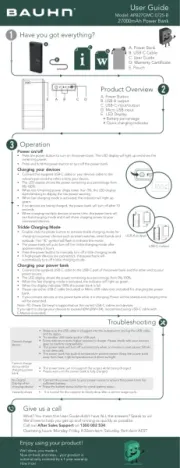
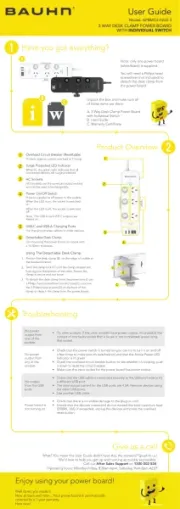
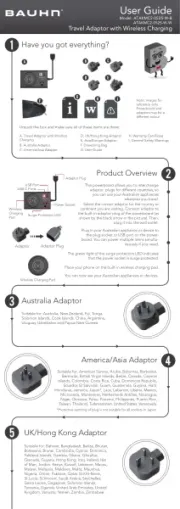
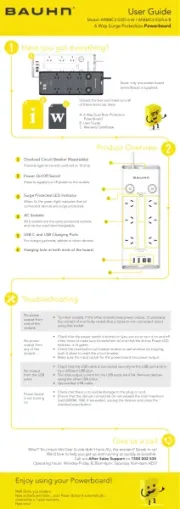
Product Overview
Have you got everything?
Operation
A. Power Bank
B. USB-C Cable
C. User Guide
E. Pouch
Power /off on
Press po r the we butto o r n n t tu n o the pow nk. Th dis lae ar b e LED p y l will ight up and show the
rema n r.ini g wepo
Press an ho d ld the ow on p e uttr b t r f e w .o tu n o f th po er bank
Chargi y sng our device
Co t pl - a y nnec the sup ied USB C c ble or our devices ca b o e le t th
relev nt or ana p t d th ote her end to yo r du evice.
D w hTh LEe display sho s t e power remaining as a er a from p cent ge
0% 100%- .
h re n e roWhen t e mai ing pow r d ps lowe th n 5%, t ED displr a he L ay
st t blin h o o nar s king to display t e l w p wer war ing.
a rg e a When f st cha ing mod is activ ted, the indica igt lor will h p t u
green.
If o n devices re rge o l u of a being cha d, the p wer bank wi l t rn f after 0 1
s on .ec ds
harWhen c gi ipl de ice samn ug m lt e v s at e time, the power a ll b nk wi
e t a xi f st ch ing mod anarg e d it e cha will shar rging ow yop e r to ur
co ec ed evicesnn t d .
A. Power Button
B. USB-A output
C. USB-C input/output
D. Micro USB input
E. LED Display
Battery percentage
Quick charging indicator
Give us a call
What? You mean this User Guide didn’t have ALL the answers? Speak to us!
We’d love to help you get up and running as quickly as possible.
Call our on . After Sales Support 1300 002 534
Operating hours: Monday-Friday, 8:30am-6pm; Saturday, 9am-6pm AEST
Enjoy using your product!
Well done, you made it.
Now sit back and relax... your product is
automatically covered by a 1-year warranty.
How nice!
Troubleshooting
User Guide
Model: APB27GMC-0725-B
knaB rewoP hAm00072
E A C D
B
C
D
E
A
B
Tr C rgi eickle ha ng Mod
Do l club e- ick the o activa e t pow on er butt t t rickle c g mode fohargin r
chargi h r a eng low ow-p er devices suc as sma t w tch s, smar nds t a b and
p ll o r f e The ower bank wi aut tu n o f th trickle cha ing morg d ter e af
appro e s.ximat ly 2 hour
Press po r the we butto o n r fn t ma ually tu n o f trickl ch g moe argin de.
If i e h gh we-po r d vic cte owee r es a e conn d p, the r ba ll nk wi
au matto ica tully rn off trickl gine ar ch g de. mo
Chargi y w kng our po er ban
Co t pl - a C onnec the sup ied USB C c ble to the USB- p rt of th ank and the o her end to youe o p wer b t r
po r rce. we sou
D w hTh LEe display sho s t e power remaining as a er a fr . p cent ge om 0%-100%
h a rg e t When t e f st cha ing mod is activa ed, the indica l igh t lor wi l t p u green.
h s y eWhen t e di pla indicat s 100% th pow r b nk is fue e a ll.
s h Plea e e us eit er USB ble (includ d) -C ca e o ro o d rr Mic USB cable (n t inclu ed) for cha ging t r he powe
bank.
If o y u con ect evices er n d t e wo th po bank ch ging t while i is ar . Po will rwer be sha ed and cha ging timr e
will be de exten d.
N werote: PD (Po
Del ery) is support h orriv ed via t e c ec d t S n U B-C cables a devices.
If yo wu ant arge your de es to e ( V to ch vic exc ed 60W 20
3A), recommend B- it Susing U C w cable h
E-Ma ke includr r ( ed).
USB-A output
USB-C output


Produkt Specifikationer

Mærke: Bauhn
Kategori: Ikke kategoriseret
Model: APB27GMC-0725

Har du brug for hjælp?

Hvis du har brug for hjælp til Bauhn APB27GMC-0725 stil et spørgsmål nedenfor, og andre brugere vil svare dig


Ikke kategoriseret Bauhn Manualer

Ikke kategoriseret Manualer

Nyeste Ikke kategoriseret Manualer

Waterstone

Waterstone 7800 Manual

11 December 2025
Kwikset

Kwikset 258 Manual

11 December 2025
Schlage

Schlage F170 Manual

11 December 2025
Moen

Moen Align 7565EV Manual

11 December 2025
ALNO

ALNO MC10244 Manual

11 December 2025
JET

JET TAK-ZX Manual

11 December 2025
Waterstone

Waterstone 1455 Manual

11 December 2025
Laica

Laica NE2015 Manual

11 December 2025