Bauhn APBMC2-0225-3 Manual

Bauhn Ikke kategoriseret APBMC2-0225-3

Læs gratis den danske manual til Bauhn APBMC2-0225-3 (2 sider) i kategorien Ikke kategoriseret. Denne vejledning er vurderet som hjælpsom af 13 personer og har en gennemsnitlig bedømmelse på 4.3 stjerner ud af 7 anmeldelser. Har du et spørgsmål om Bauhn APBMC2-0225-3, eller vil du spørge andre brugere om produktet?
Side 1/2
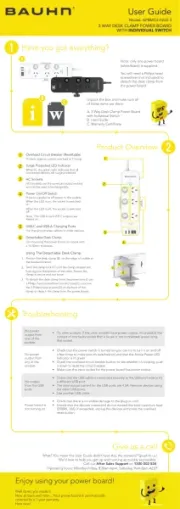
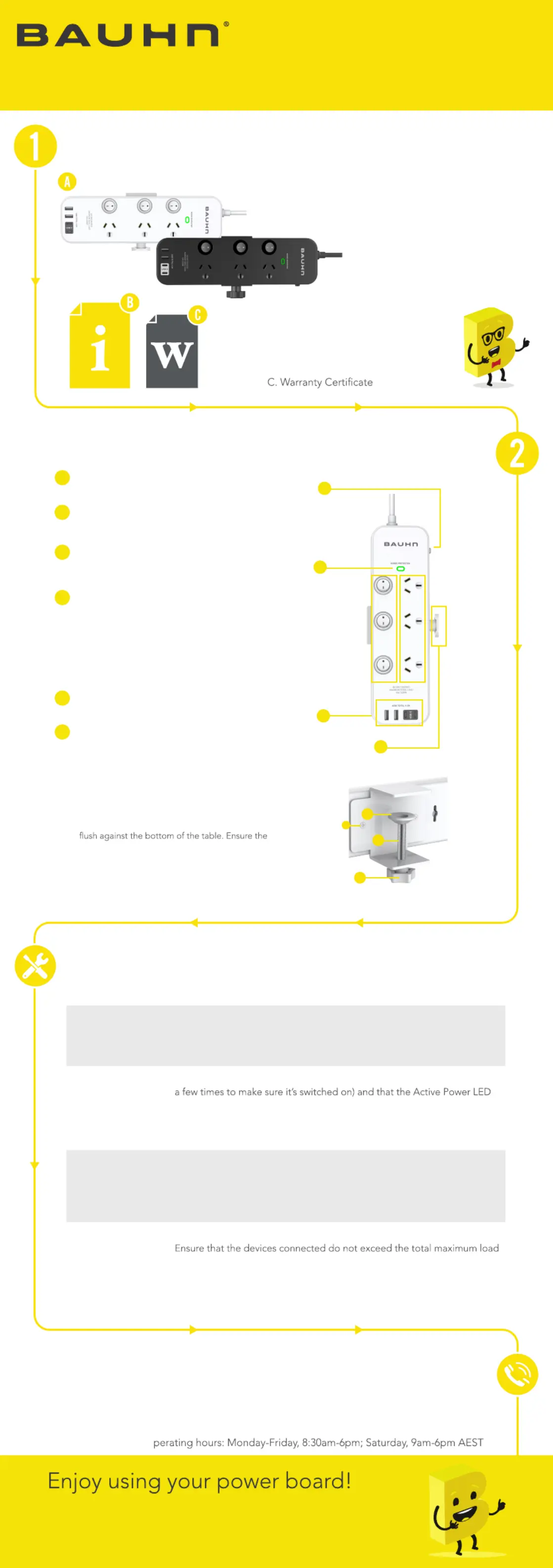
Product Overview
Troubleshooting
Have you got everything?
Unpack the box and make sure all
of these items are there:
Note: only one power board
(white/black) is supplied
.
screwdriver (not included) to
detach the desk clamp from
the power board.
User Guide
Model: APBMC2-0225-3
A. 3-Way Desk Clamp Power Board
with Individual Swtich
B. User Guide
Give us a call
!su ot kaepS ?srewsna eht LLA evah tndid ediuG resU siht naem uoY ?tahW
We’d love to help you get up and running as quickly as possible.
Call our on . After Sales Support 1300 002 534
O
No power
output from
one of the
sockets
Try other sockets. If the other sockets have power output, it’s probably the
contact of one faulty socket that is loose or not connected; avoid using
that socket.
No power
output from
any of the
sockets
Check that the power switch is turned on (you can try to turn it on and off
Indicator is lit green.
Check the overload circuit breaker button to see whether it’s tripping, push
it down to reset the circuit breaker.
Make sure the input socket for the power board has power output.
No output
from the USB
ports
Check that the USB cable is connected securely to the USB port and/or try
a different USB port.
The total output current for the USB ports are 4.5A. Remove devices using
the other USB ports.
Use another USB cable.
Power board is
not turning on
Check that there is no visible damage to the plug or cord.
(2400W, 10A). If exceeded, unplug the devices and press the overload
reset button.
Well done, you made it.
Now sit back and relax... Your power board is automatically
covered by a 1-year warranty.
How nice!
3 WAY DESK CLAMP POWER BOARD
WITH INDIVIDUAL SWITCH
5
2
1
6
Overload Circuit Breaker (Resettable)
Protects against current overload at 10 amp
Surge Protected LED Indicator
Power On/Off Switch
Press to supply/cut off power to the outlets.
For mounting the power board on a desk with
a 15-50mm thickness.
Detachable Desk Clamp
6
USB-C and USB-A Charging Ports
For charging phones, tablets or other devices.
5
AC Sockets
All 3 sockets are the same protected sockets
and can be used interchangeably.
When the LED is on, the socket is switched
on.
When the LED is off, the socket is switched
off.
Note: The USB A and USB C outputs are
always on.
3
4
When lit, the green light indicates that all
connected devices are surge protected.
1
2
Using The Detachable Desk Clamp
1.
Position the desk clamp (B) on the edge of a table at
the desired location.
2.
Twist the clamp lock (C) until the clamp stopper sits
clamp is secure and not loose.
3.
To detach the desk clamp from the power board, use
a Philips head screwdriver (not included) to unscrew
the 2 Philips head screws (D) on the back of the
clamp to detach the clamp from the power board.
A
B
C
D


Produkt Specifikationer

Mærke: Bauhn
Kategori: Ikke kategoriseret
Model: APBMC2-0225-3

Har du brug for hjælp?

Hvis du har brug for hjælp til Bauhn APBMC2-0225-3 stil et spørgsmål nedenfor, og andre brugere vil svare dig


Ikke kategoriseret Bauhn Manualer

Ikke kategoriseret Manualer

Nyeste Ikke kategoriseret Manualer

Waterstone

Waterstone 7800 Manual

11 December 2025
Kwikset

Kwikset 258 Manual

11 December 2025
Schlage

Schlage F170 Manual

11 December 2025
Moen

Moen Align 7565EV Manual

11 December 2025
ALNO

ALNO MC10244 Manual

11 December 2025
JET

JET TAK-ZX Manual

11 December 2025
Waterstone

Waterstone 1455 Manual

11 December 2025
Laica

Laica NE2015 Manual

11 December 2025