5
21
4 6
3
User ManUal
3
YEAR WARRANTY
PRoducEd IN
chINA FoR
ALdI SToRES LTd.
PO BOx 26,
AtherstOne,
WArWickshire,
cV9 2sh
ALdI SToRES (IRELANd) LTd.
PO BOx 726,
nAAs,
cO. kildAre
Visit us At WWW.Aldi.cOm
Made in China
After sAles suPPOrt 858441
GB
01827 438 013
serVice-uk@PrOtel-serVice.cOm
IE
0124 695 20
serVice-uk@PrOtel-serVice.cOm
mOdel: kl-1 04/2026
OriginAl instructiOn mAnuAl
Great care has gone into the manufacture of this product and it should therefore provide you with years
of good service when used properly.
In the event of product failure within its intended use over the course of the first 3 years after date of
purchase, we will remedy the problem as quickly as possible once it has been brought to our attention.
In the unlikely event of such an occurrence, or if you require any information about the product, please
contact us via our helpline support services, details of which are to be found both in this manual and on
the product itself.
V01⁄0025
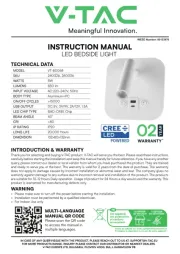
Kids night light
5 PRoducT ovERvIEW
Light Dome
M Button (Touch Mode button)
Body
Indicator Light
Tripod Stand
USB-C Charging Port
Power Button (Touch)
USB Type C cable
6 BEFoRE FIRST uSE
6.1 check PrOduct And cOntents
WARNING! RISK OF SUFFOCATION!
» Keep all packaging materials away from children and pets – these materials pose potential
hazards, such as choking or swallowing small parts.
CAUTION! RISK OF DAMAGE!
» Be careful when opening the packaging to avoid damaging the product. Do not use sharp objects.
1. Remove the product from the packaging.
2. Remove all packaging materials and any plastic or protective films.
3. Check that all items are included (see chapter PrOduct OVerVieW).
4. Inspect the product and its components for damage. If you notice any damage, do not use the
product. Instead, contact the service center using the contact information provided on the cover
page of this manual.
4.2 exPlAnAtiOn Of symBOls
The following symbols are used in this manual, on the product, or on the packaging.
Read the manual carefully before you use the product.
Products marked with this symbol comply with all applicable EU
regulations for the European Economic Area.
Products marked with this symbol are operated with direct current (DC).
Use the product only in dry indoor environments.
Products marked with this symbol comply with protection class III.
This symbol provides you with useful additional information for assembly
or operation.
3 Years warranty
Recycle
Sort and dispose of the packaging materials according to their type,
utilizing your local recycling facilities
for paper, cardboard, and light packaging.
4.3 generAl sAfety instructiOns
WARNING! RISK OF ELECTRIC SHOCK!
» Improper use of the product may result in an increased risk of injury.
• Do not operate the product if it shows visible damage or if the USB-C charging cable is defective.
• When charging, connect the product only to a nearby and easily accessible power source so that it
can be quickly disconnected in case of malfunction.
• If the accessory, the product, or any parts are damaged, they must be replaced by the manufacturer,
its service center, or a similarly qualified person.
• Never immerse the product or accessories in water or other liquids. Do not clean with steam
cleaners.
• Do not place the product or its accessories on the containers filled with liquids, such as vases.
• The product and its accessories must not be exposed to dripping or splashing water.
7 oPERATIoN
7.1 sWitching the PrOduct On/Off
1. Press the power button to turn the product on.
2. Press the power button again to turn the product off.
7.2 selecting the light mOde
1. Press the M button to switch between the four light modes:
− Amber
− Neutral White
− Daylight White
− RGB color cycle (Red - Orange - Yellow - Green - Cyan - Blue - Purple, with fade transition)
2. To fix a specific RGB color, press the power button twice quickly.
7.3 dimming the light
1. When the light is on, press and hold the power button to adjust brightness continuously.
2. Release the power button when the desired brightness is reached.
7.4 timer functiOn
1. Press and hold the M button to activate the 1-hour auto turn-off timer.
2. The blue indicator light will turn on to confirm the timer is set.
7.5 chArging the PrOduct
• Connect the supplied USB Type-C cable to the charging port .
• Plug the other end into a suitable USB power source.
NOTICE
» The product cannot be operated while charging.
• Use a power adapter (not included) only if it has an output voltage that matches the product’s input
voltage (5 V). Refer to the product label. Failure to do so may result in fire or electric shock.
• Improper use of the USB-C charging system may lead to electric shock or fire hazard.
WARNING! RISK OF INJURY! INSTRUCTIONS FOR CHILDREN SAFETY
» Hazards to children and persons with reduced physical, sensory, or mental capabilities (e.g.,
partially disabled persons, elderly persons with limited physical and mental capabilities) or
lack of experience and knowledge (e.g., older children).
• This product can be used by children aged eight years and above, as well as by persons with
reduced physical, sensory, or mental abilities or lack of experience and knowledge, provided
they are supervised or instructed regarding the safe use of the product and understand the
resulting dangers.
• Children must not play with the product. Cleaning and user maintenance must not be carried
out by children without supervision.
• Keep children younger than eight years away from the product.
• Do not allow children to play with the packaging film. Children can get caught in it while
playing and suffocate.
WARNING! RISK OF DAMAGE AND INJURY!
» Improper handling of the
product
can result in injury.
• Always place the product on flat surfaces to prevent it from falling over.
• Never place the product on or near hot surfaces (e.g., stovetops, etc.).
• Never expose the product to high temperatures (heating, etc.) or weather conditions (rain, etc.).
• Never pour liquid into the product.
• Do not make any modifications to the product. Use the product only as recommended by the
manufacturer.
• Do not drop the product or hit it.
• Do not expose it to strong vibrations or magnetic fields.
• Use only the supplied cable or certified equivalent.
• The built-in rechargeable battery is not user-replaceable. Do not attempt to open the product
• Dispose of the product at an appropriate collection point for electronic waste. Do not dispose of with
household waste.
NOTE! RISK OF DAMAGE!
» Improper handling of the product may result in damage to the product.
• Protect the product from moisture, water droplets, and splashing water.
• This product is intended exclusively for use in private households or comparable areas of use
and is not suitable for commercial use.
• The product is only designed for use in closed rooms.
• If you notice any damage from transportation, contact the service immediately.
• Under the environment with electrostatic discharge (ESD), the product may malfunction and may
require a reset by the user to function properly again.
8 TRouBLEShooTINg
PrOBlem reAsOn sOlutiOn
Product does not switch on • Battery is empty
• Power button not
pressed correctly
• Internal fault
• Recharge the product using
the supplied USB-C cable .
• Press the power button
firmly to switch it on.
• If the problem persists,
contact customer service.
Light does not change modes • M button not pressed
correctly
• Product needs to be reset
• Press the M button again
slowly.
• Switch the product off and
back on, then retry.
Brightness cannot be adjusted • Power button not pressed
and held correctly
• Press and hold the power
button until brightness
changes.
Timer function does not work • M button not pressed and
held long enough
• Product not switched on
• Make sure the product is
turned on.
• Press and hold M button
until the blue indicator light
appears.
Product does not charge • USB-C cable not
connected properly
• Power source not supplying
power
• Cable is defective
• Internal fault
• Ensure both ends of the
USB-C cable are firmly
connected.
• Try another USB power
adapter or port.
• Replace the cable if
necessary.
• If the problem persists,
contact customer service.
Product does not light up while
charging
• This is normal operation • The product is designed not
to light up while charging.
No action required.
1 ScoPE oF dELIvERY
Please check the completeness of the delivery and notify us within 14 days of purchase if the delivery is
incomplete. The package you purchased should contain the following items:
1. Kids Night Light KL-1
2. USB Type C cable
3. User Manual
2 gENERAL INFoRmATIoN
This user manual (hereinafter referred to as the “manual”) is part of the product and contains
important information regarding startup and usage. Please read the manual carefully
especially the safety section before using the product. Failure to follow the instructions in
this manual may result in serious injury and/or damage to the product. Keep this manual for
future reference. If you pass the product on to a third party, make sure to include this manual. If you
need a digital copy of the manual, please contact the service center.
3 INTENdEd uSE
This product is designed for indoor lighting and to create a pleasant ambiance in homes, children’s
rooms, and other indoor environments. The product is intended exclusively for private household
use. The product is not a toy for children. Only use the product as described in this instruction
manual. Any other use is considered improper and may result in property damage or personal
injury. The manufacturer or dealer assumes no liability for damage caused by improper or incorrect
use or for unauthorized changes.
4 SAFETY
4.1 exPlAnAtiOn Of signAl WOrds
The following signal words are used in this manual, on the product, and/or on the packaging.
DANGER!
» This signal word indicates a hazardous situation which, if not avoided, will result in death or
serious injury.
WARNING!
» This signal word indicates a hazardous situation which, if not avoided, could result in death or
serious injury.
CAUTION!
» This signal word also indicates a hazardous situation which, if not avoided, may result in property
damage.
NOTICE
» This signal word is used to highlight helpful tips and best practices that are not related to
personal injury.
M