EtherWAN EX42905 Manual


Læs gratis den danske manual til EtherWAN EX42905 (2 sider) i kategorien Ikke kategoriseret. Denne vejledning er vurderet som hjælpsom af 20 personer og har en gennemsnitlig bedømmelse på 4.5 stjerner ud af 10.5 anmeldelser. Har du et spørgsmål om EtherWAN EX42905, eller vil du spørge andre brugere om produktet?
Side 1/2
W70G-EX42900Q1 Page 1
Installation Guide
EX42905 | Hardened Unmanaged Switch
Copyright 2023 EtherWAN Systems, Inc. All Rights Reserved 02/17/2023
1 Unpacking
Open the carton and unpack the items. Your package
should include:
One EX42905 or EX42914 Switch
If any items are missing or damaged, notify your
EtherWAN representative. If possible, save the carton
and packing material in case you need to ship or store
the switch in the future.
2 Equipment Needed
Category 5 or better cable for RJ-45 ports
Appropriate fiber cable for fiber ports
3 Select a Location
Installation: DIN rail. Place the device on the DIN
rail from above using the slot. Push the front of
the device toward the mounting surface until it
audibly snaps into place.
Choose a dry area with ambient temperature
between -40 and 75°C (-40 and 167°F).
Keep away from heat sources, sunlight, warm air
exhausts, hot-air vents, and heaters.
Be sure there is adequate airflow.
4 Connect to the Data Ports
Your switch has the following ports:
4, 5 10/100/1000BASE-T ports
0 or 1 1000BASE-X fiber port
5 Connect Power
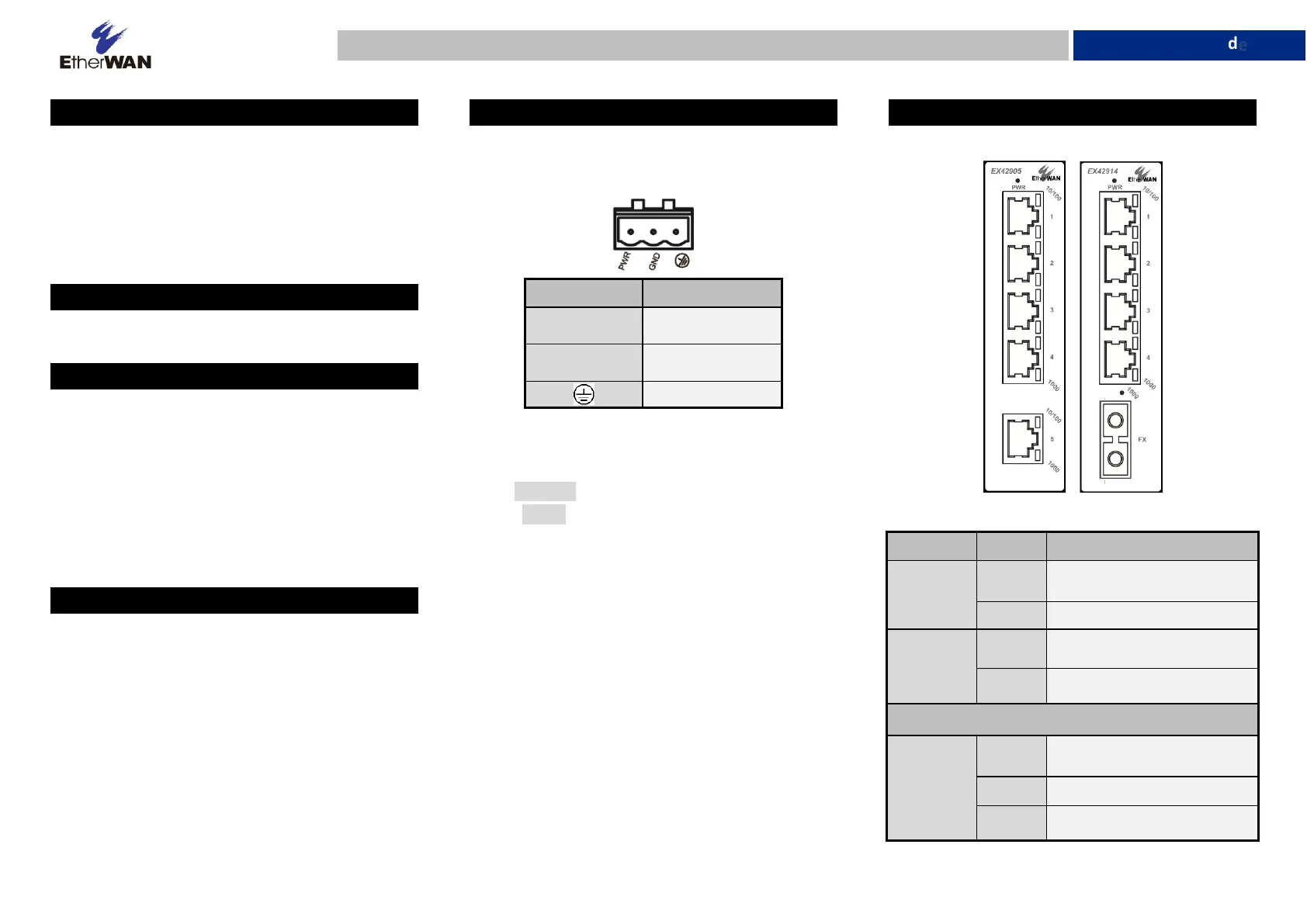
Power is supplied via a 12-48VDC terminal block
connected to a DC power cord. Power consumption is
6.5W Max. 0.25A@24VDC.
Pin
Description
PWR
Power Input
GND
Power Ground
Earth Ground
Power-Up Sequence
When the switch is powered up:
All Link/ACT LEDs blink momentarily.
The Power LED lights up and stays lit.
LEDs for every port connected to a device will
flash, as the switch conducts a brief Power On Self-
Test (POST).
6 Port Status LED Indicators
LED
State
Description
Power 1, 2
(Green)
On
Switch is powered ON
correctly
Off
Switch is not receiving power
Alarm (Red)
On
Relay alarm on
Off
Relay alarm off
Gigabit Ports
Link/Act
(Green)
On
Valid network connection
established.
Off
No link.
Blinking
Transmitting or receiving data


Produkt Specifikationer

Mærke: EtherWAN
Kategori: Ikke kategoriseret
Model: EX42905

Har du brug for hjælp?

Hvis du har brug for hjælp til EtherWAN EX42905 stil et spørgsmål nedenfor, og andre brugere vil svare dig


Ikke kategoriseret EtherWAN Manualer

EtherWAN

EtherWAN EX35000 Manual

15 November 2025
EtherWAN

EtherWAN ED3238 Manual

13 November 2025
EtherWAN

EtherWAN AiR PACE Manual

13 November 2025
EtherWAN

EtherWAN EN301 Manual

7 November 2025
EtherWAN

EtherWAN SPL90BT Manual

7 November 2025
EtherWAN

EtherWAN EDGE 2 Manual

5 November 2025
EtherWAN

EtherWAN OttoE 10H Manual

5 November 2025
EtherWAN

EtherWAN EX42905 Manual

4 November 2025
EtherWAN

EtherWAN ED3575 Manual

4 November 2025
EtherWAN

EtherWAN AiR PACE CL Manual

4 November 2025

Ikke kategoriseret Manualer

Nyeste Ikke kategoriseret Manualer

KoolStar

KoolStar Starter 950 Manual

25 December 2025
VOX

VOX SETSF5702B Manual

25 December 2025
Yamazen

Yamazen SUC-202 Manual

25 December 2025
Vaxcel

Vaxcel OW37081 Manual

25 December 2025
Vaxcel

Vaxcel T0253 Manual

25 December 2025
Reelcraft

Reelcraft L 5700 Manual

25 December 2025
Yamazen

Yamazen YTY-A410 Manual

25 December 2025
BlaknBlu

BlaknBlu Oscar DSF Manual

25 December 2025