StarTech.com SSTDC4D-LAPTOP-LOCK Manual

StarTech.com Låse SSTDC4D-LAPTOP-LOCK

Læs gratis den danske manual til StarTech.com SSTDC4D-LAPTOP-LOCK (2 sider) i kategorien Låse. Denne vejledning er vurderet som hjælpsom af 37 personer og har en gennemsnitlig bedømmelse på 4.3 stjerner ud af 19 anmeldelser. Har du et spørgsmål om StarTech.com SSTDC4D-LAPTOP-LOCK, eller vil du spørge andre brugere om produktet?
Side 1/2
Quick-Start Guide
To view manuals, FAQs, videos, drivers, downloads, technical drawings, and more, visit www.startech.com/support
Manual Revision: May 8, 2024
Product ID
SNANOC4D-LAPTOP-LOCK / SNBLC4D-LAPTOP-LOCK / SSTDC4D-LAPTOP-LOCK
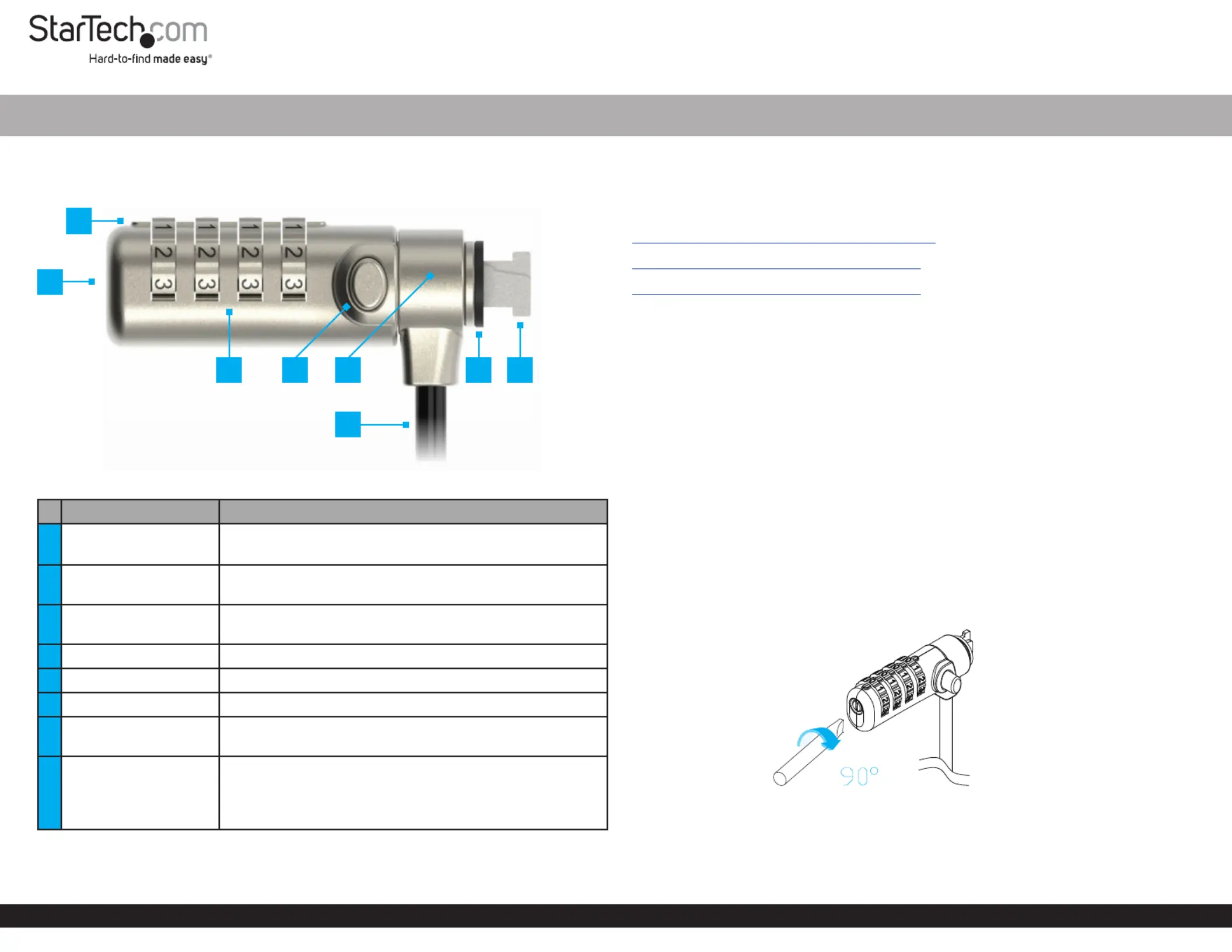
Components Function
1
(Not shown)
Used to set or reset the Combination Code
Use a to rotateFlat-head Screwdriver
2Guide Line
Align the digits on the with the Combination Dial
Guide Line
3Combination Dial
Rotate each row of numbers until the desired
combination is aligned with the Guide Line
4Release Button to or thePress and Hold Unlock Lock Lock Tip
5Lock Head Enables 360° rotation
6Security Cable Used to secure a to a stationary objectDevice
7Lock Spacer
Prevents the from scratching the Lock Head Secured
Device Security Slotand improves the tting on the
8Lock Tip
Secures the to a compatible Laptop Cable Lock
Security Slot
K-Slot (T-Bar), Nano, or Noble Wedge® compatible
depending on the model Laptop Lock
Slim Combination Laptop Lock - 6.6ft (2m)
Requirements
For the latest manuals, product information, technical specications, and declarations
of conformance, please visit:
www.StarTech.com/SNANOC4D-LAPTOP-LOCK
www.StarTech.com/SNBLC4D-LAPTOP-LOCK
www.StarTech.com/SSTDC4D-LAPTOP-LOCK
Device compatible with a matching security slot
Flat-head screwdriver
Package Contents
Laptop Security Lock x 1
Hook-and-Loop Strap x 1
Quick-Start Guide x 1
Operation
Change the Combination Code
1. If this is the rst time setting the , dial the default code Combination Code
0 0 0 0 Combination Dial Guide Line- - - by aligning the numbers on the with the .
Note: If the Combination Code has been changed from the default code, dial the
current Combination Code.
2. Insert a into the and while turning it Flathead Screwdriver Reset Button Push
Clockwise. (Figure 1)
Figure 1
3. Rotate the to the desired . Combination Dial New Combination
4. Insert a into the and it while turning it to Flathead Screwdriver Reset Button Push
Counterclockwise.
1
73 8
*Product may vary from image
2
6
4 5


Produkt Specifikationer

Mærke: StarTech.com
Kategori: Låse
Model: SSTDC4D-LAPTOP-LOCK

Har du brug for hjælp?

Hvis du har brug for hjælp til StarTech.com SSTDC4D-LAPTOP-LOCK stil et spørgsmål nedenfor, og andre brugere vil svare dig


Låse StarTech.com Manualer
Låse Manualer

Nyeste Låse Manualer

AXA

AXA Solid Plus Manual

5 Januar 2026
AXA

AXA Fold Lite 100 Manual

5 Januar 2026
AXA

AXA Atlas Manual

4 Januar 2026
AXA

AXA Zipper 53 Manual

4 Januar 2026
AXA

AXA Newton Pro Manual

4 Januar 2026
AXA

AXA Block XXL Manual

4 Januar 2026
AXA

AXA Ren 2 Manual

4 Januar 2026
Rocstor

Rocstor Rocbolt C21 Manual

25 December 2025
Rocstor

Rocstor Rocbolt S24 Manual

25 December 2025
Rocstor

Rocstor Rocbolt W25 Manual

24 December 2025