ATOLL ELECTRONIQUE
OWNER’S MANUAL ~ POWER AMPLIFIER
MA100
ATOLL ELECTRONIQUEPage 4
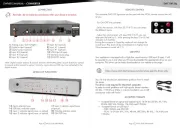
1) Speakers output (Right).
2) Speakers output (Left).
3) Mono switch.
4) Analog input.
5) Analog output.
6) Trigger 12V input
(1)
.
7) Power input.
8) ON/SLEEP power switch.
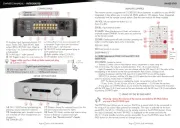
Your appliance can be switched on a mono power amplifier. Here are the steps to
switch it on mono:
– Switch off and unplug all cables of your amplifier:
(a) Put the switch (3) to MONO (on the Left).
(b) Plug the signal (from the preamp.) into the AMPLI IN (White).
(c) Make a link (cable) between Line In (4) (red) and Line Out (5) (white).
– Link the Speaker as shown below:
(d) Left Red output to Black input of the speaker.
(e) Right Red output to Red input of the speaker.
– Do the same way for the second Mono amplifier for the other speaker.
This input allows the ON/SLEEP control of your amplifier, simultaneously with any
device with a 12V Trigger output.
In order for the system to operate, the ON/SLEEP switch on your MA100 must
remain in the SLEEP position (0).
If the switch is in the ON position (I), the amplifier will work but not the Trigger
function.
9) Mono mode led indicator.
10) Power ON/SLEEP led indicator.
CONNECTING
DETAILS OF FUNCTIONS
MONO MODE
TRIGGER INPUT
Page 5
Trigger cable must be a Male to Male stereo jack plug Ø 3,5 mm (1/8”).
1 2
3 4 5 6 7 8
Jack
Ø 3,5 mm
(1)
This input allows the control ON/SLEEP of your amplifier
simultaneously to any device with a 12V Trigger outlet. For the
system to operate, the ON/SLEEP button on your MA100 must
remain in the SLEEP position (0). If the switch is in the ON position
(I), the amplifier will work but not the Trigger function.
(a) (c)
(b)
(d)
(e)
+–
Speaker
9 10