Extron DVI DA Manual

Extron Modtager DVI DA

Læs gratis den danske manual til Extron DVI DA (5 sider) i kategorien Modtager. Denne vejledning er vurderet som hjælpsom af 51 personer og har en gennemsnitlig bedømmelse på 4.9 stjerner ud af 26 anmeldelser. Har du et spørgsmål om Extron DVI DA, eller vil du spørge andre brugere om produktet?

Side 1/5
1
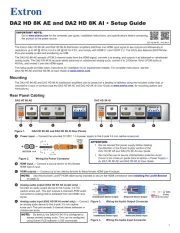
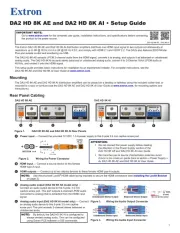
DVI DA2 and DVI DA 4 • User Guide
This guide describes the installation and operation of the Extron DVI DA2 and DVI DA4 Distribution Ampliers. Unless stated
otherwise, “distribution amplier” or “the unit” in this guide refer to both models.
About the DVI DA2 and DVI DA4
The Digital Visual Interface (DVI) Distribution Ampliers (DAs) have one input and either two (DVI DA2) or four (DVI DA4) outputs.
Output 1 for each model is for a local monitor and is used for Digital Display Channel (DDC) reference.
Both distribution ampliers accept one single link DVI-D input and drive two (DVI DA2) or four (DVI DA4) single link DVI-D output
signals.
Ext
ron
DV
I 2DA
Dist
ribution A rmplie
PC
w/ DVI O tutpu
Loca orl Monit
Flat Panel Display
w/ DVI tInpu
Figure 1. DVI DA2 Application Diagram
DVI DA2 and DVI DA4 Features
External power supply — The DVI DA2 and DVI DA4 are powered by an external 12VDC power supply (provided with the
units).
DVI-D input — Both distribution ampliers accept one single link DVI-D input with a range of resolutions up to 1920 x 1200
or 1080p @ 60 Hz.
Input equalization — Input Equalization (EQ) conditions the input signals to ensure the integrity of the signals delivered to
the output devices.
DVI-D outputs — The units drive two (DVI DA2) or four (DVI DA4) single link DVI-D output signals.
DDC routing to the local monitor — Output 1 is used as a DDC reference and is labeled “Local Monitor” for easy reference.
The video source uses the bidirectonal DDC to communicate with the local monitor, which allows the source to determine the
resolution and refresh rate of the signal that it sends.
NOTES:
Since output 1 is used as the reference, all other display devices must be capable of handling resolutions equal to or
greater than that of the local monitor.
The actual signal transmission distance can vary greatly and depends on signal resolution, cable type, cable quality,
graphics card, and the display used in the system.
Versatile mounting options — Both units are 1U high, 3 inches (7.62 cm) deep, and 1/2rack (8.7 inches or 22.1 cm) wide,
allowing them to be conveniently mounted in a rack, mounted under a desk, or set on a tabletop.


Produkt Specifikationer

Mærke: Extron
Kategori: Modtager
Model: DVI DA
Vekselstrømsindgangsfrekvens: 50 - 60 Hz
Bredde: 222 mm
Dybde: 76 mm
Højde: 44 mm
Vægt: 1300 g
Produktfarve: Black, Stainless steel
Pakkevægt: 1090 g
Pakkedybde: 337 mm
Pakkebredde: 229 mm
Pakkehøjde: 114 mm
Opbevaringstemperatur (T-T): -40 - 70 °C
Relativ luftfugtighed ved drift (H-H): 10 - 90 %
Relativ luftfugtighed ved opbevaring (H-H): 10 - 90 %
Driftstemperatur (T-T): 0 - 50 °C
Certificering: CE, CUL, UL\nCE, C-tick, FCC Class A, ICES, VCCI
Indgangsspænding: 100-240 V
Maksimal videoopløsning: 1920 x 1200 pixel
Maksimal dataoverførselshastighed: 4.95 Gbit/sek.
Stativ-montering: Ja
Båndbredde: - MHz
DVI indgangs-porte: 1
DVI udgangs-porte: 4

Har du brug for hjælp?

Hvis du har brug for hjælp til Extron DVI DA stil et spørgsmål nedenfor, og andre brugere vil svare dig


Modtager Extron Manualer
Modtager Manualer

Nyeste Modtager Manualer

Atoll

Atoll MA100 Manual

8 December 2025
Fostex

Fostex AP25 Manual

7 December 2025
Fostex

Fostex PC200USB-HR Manual

7 December 2025
Fostex

Fostex PC200USB Manual

7 December 2025
Fostex

Fostex AP05 Manual

6 December 2025
Atoll

Atoll AV500 Manual

6 December 2025
Atoll

Atoll AV100 Manual

5 December 2025