StarTech.com USB312SAT3CB Manual


Læs gratis den danske manual til StarTech.com USB312SAT3CB (2 sider) i kategorien Kabler til computere og periferiudstyr. Denne vejledning er vurderet som hjælpsom af 25 personer og har en gennemsnitlig bedømmelse på 5.0 stjerner ud af 13 anmeldelser. Har du et spørgsmål om StarTech.com USB312SAT3CB, eller vil du spørge andre brugere om produktet?

Side 1/2
Instruction manual
DE: Bedienungsanleitung - de.startech.com
FR: Guide de l'utilisateur - fr.startech.com
ES: Guía del usuario - es.startech.com
IT: Guida per l'uso - it.startech.com
NL: Gebruiksaanwijzing - nl.startech.com
PT: Guia do usuário - pt.startech.com
Manual Revision: 10/22/2015
For the latest information, technical specications, and support for
Packaging contents
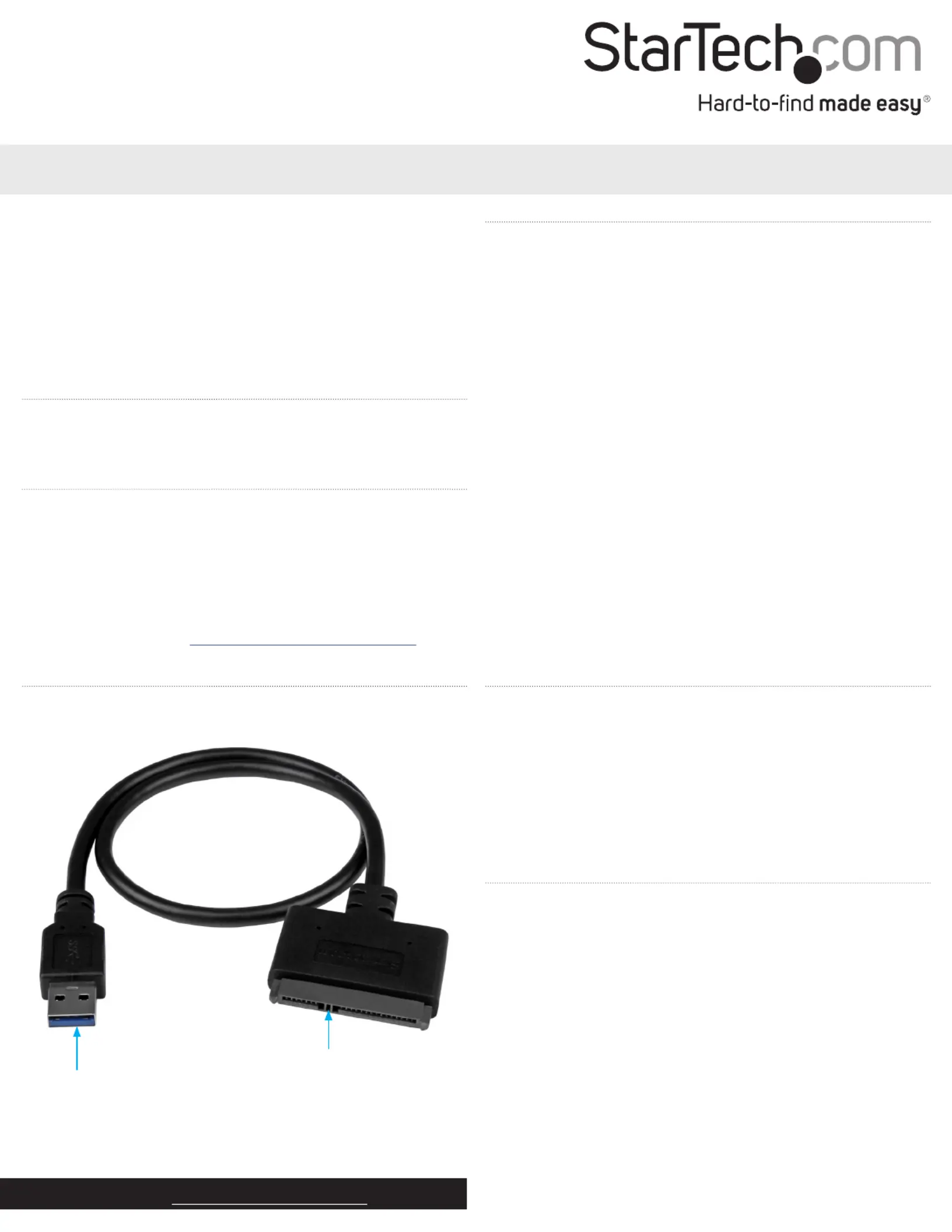
1 x USB 3.1 to SATA 2.5 in. HDD adapter cable
1 x quick start guide
System requirements
USB-enabled computer system with an available USB port
2.5 in. SATA drive
Note: To obtain the maximum USB throughput, you must use a
computer with a USB 3.1 Gen 2 port.
Supported operating systems are subject to change. For the latest
requirements, please visit www.startech.com/USB312SAT3CB.
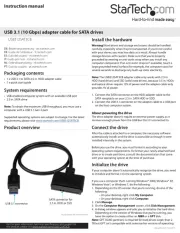
USB312SAT3CB
USB 3.1 (10 Gbps) adapter cable for SATA drives
*actual product may vary from photos
Product overview
USB 3.1 connector
SATA connector for
2.5 in. HDD or SSD
Install the hardware
Warning! Hard drives and storage enclosures should be handled
carefully, especially when theyre transported. If you’re not careful
with your drives, you may lose data as a result. Always handle
storage devices with caution. Make sure that you’re properly
grounded by wearing an anti-static strap when you install any
computer component. If an anti-static strap isn’t available, touch a
large grounded metal surface (for example, the computer case) for
several seconds to discharge any built-up static electricity.
Note: The USB312SAT3CB adapter cable only works with 2.5 in.
HDD (hard drives) and SSD (solid state drives), because 3.5 in. HDDs
and optical drives require 12V of power and the adapter cable only
provides 5V of power.
1. Connect the SATA connector on the HDD adapter cable to the
SATA receptacle on your 2.5 in. SATA HDD or SDD.
2. Connect the USB 3.1 connector on the adapter cable to a USB port
on the host computer system.
About powering the drive
The drive adapter doesn’t require an external power supply, as it
receives enough power from the USB Bus that its connected to.
Connect the drive
After the cable is attached to a computer, the necessary software
automatically installs and the drive is accessible as though it were
installed internally in the system.
Before you use the drive, you must format it according to your
operating system requirements. To format your newly attached hard
drive or to create partitions, consult the documentation that came
with your operating system at the time of purchase.
Initialize the drive
If your computer doesn’t automatically recognize the drive, you need
to initialize and format it to the operating system.
If you use a computer that’s running Windows® 2000, Windows® XP,
Windows Vista®, or Windows 7, do the following:
1. Depending on the OS version that you’re running, do one of the
following:
On your desktop, right-click .My Computer
On your desktop, right-click .Computer
2. Click .Manage
3. On the Computer Management Disk Management screen, click .
4. A dialog window appears and asks you to initialize the hard drive.
Depending on the version of Windows that you’re running, you
have the option to create either an or a disk.MBR GPT
Note: GPT (GUID partition) is required for hard drives larger than 2
TB but GPT isn’t compatible with some earlier versions of operating


Produkt Specifikationer

Mærke: StarTech.com
Kategori: Kabler til computere og periferiudstyr
Model: USB312SAT3CB
Bredde: 45 mm
Dybde: 515 mm
Højde: 8 mm
Vægt: 39 g
Brugervejledning: Ja
Produktfarve: Sort
Pakkevægt: 52 g
Pakkedybde: 220 mm
Pakkebredde: 198 mm
Pakkehøjde: 10 mm
Opbevaringstemperatur (T-T): -10 - 55 °C
Driftstemperatur (T-T): 0 - 70 °C
Husmateriale: Plast
Certificering: CE, FCC, REACH
Kabellængde: 0.5 m
Bæredygtighedscertifikater: CE, RoHS
Hovedkassen højde (udvendigt): 420 mm
Hovedkassens længde (udvendigt): 415 mm
Hovedkassens bredde (udvendigt): 435 mm
Værtsgrænseflade: USB Type-A
USB-drevet: Ja
Produkter pr. hovedkasse (udvendigt): 200 stk
Stik 1: USB 3.1 A
Stik 2: SATA 7+15 pin
Stik 1 køn: Hanstik
Stik 2 køn: Hanstik
Dataoverførselshastighed: 10 Gbit/sek.
Relativ luftfugtighed: 40 - 50 %
Stik 1 formfaktor: Lige
Stik 2 formfaktor: Lige
Hot-swap: Ja
Maksimalt understøttet lagerkapacitet: 2 TB
Understøttede lagerdisk størrelser: 2.5 "
Understøtter UASP: Ja
Chipsæt: ASMedia - ASM1351

Har du brug for hjælp?

Hvis du har brug for hjælp til StarTech.com USB312SAT3CB stil et spørgsmål nedenfor, og andre brugere vil svare dig


Kabler til computere og periferiudstyr StarTech.com Manualer
Kabler til computere og periferiudstyr Manualer

Nyeste Kabler til computere og periferiudstyr Manualer

Legrand

Legrand C100 Manual

15 December 2025
Legrand

Legrand C210 Manual

10 December 2025
Legrand

Legrand C910 Manual

10 December 2025
Elbe

Elbe CA-1105-MICRO Manual

29 November 2025
Qoltec

Qoltec 50438 Manual

13 November 2025
Qoltec

Qoltec 53906 Manual

11 November 2025
gofanco

gofanco HDBaseT-HD20 Manual

6 November 2025
Vantec

Vantec CB-ISA225-U3 Manual

3 November 2025
Hosa

Hosa Edge CMK-010AU Manual

3 November 2025
gofanco

gofanco HDbitT8Pv2 Manual

3 November 2025