AFX TPWW70050LWH Manual
AFX Lys TPWW70050LWH

Læs gratis den danske manual til AFX TPWW70050LWH (1 sider) i kategorien Lys. Denne vejledning er vurderet som hjælpsom af 4 personer og har en gennemsnitlig bedømmelse på 4.5 stjerner ud af 2.5 anmeldelser. Har du et spørgsmål om AFX TPWW70050LWH, eller vil du spørge andre brugere om produktet?

Side 1/1
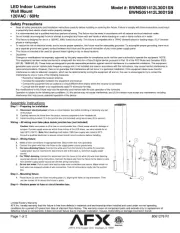
LED Outdoor Luminaires
Wall Mount
120VAC / 60Hz
Page 1 of 1 R1 8061226
Part #: TPWW70050LWH
Limited Factory Warranty
AFX Inc. hereby warranty that this xture is free from defects in materials and workmanship when installed and used under normal operating conditions
for a period of 5 years from date of shipment from factory. This warranty covers all component parts and extends only to replacement of defective xture
Safety Precautions
Read all safety precautions and installation instructions carefully before installing or servicing this xture. Failure to comply with these instructions could result in potentially fatal
electric shock and/or property damage.
It is recommended that a qualied electrician perform all wiring. This xture must be wired in accordance with all national and local electrical codes.
This xture is designed for use in a 120VAC, 60Hz fused circuit. This xture is not compatible with dimmers.
Make sure that the power source conforms to the requirements of the xture. (See labels on the xture housing).
To reduce the risk of electrical shock, and to assure proper operation, this xture must be adequately grounded. To accomplish proper grounding, there must be a separate ground
wire (green) contact between this xture and the ground connection of your main power supply panel.
This xture is intended to be used for general outdoor lighting in dry, damp or wet locations. For wet locations, xture must be mounted 48” above ground level.
Disclaimer
Changes or modications not expressly approved by the party responsible for compliance could void the user’s authority to operate the equipment. NOTE: This equipment has been
tested and found to comply with the limits for a Class B digital device, pursuant to Part 15 of the FCC Rules and Canadian IC / NMBES-005 (B) -005 (B). These limits are designed to
provide reasonable protection against harmful interference in a residential installation. This equipment generates, uses and can radiate radio frequency energy and, if not installed
and used in accordance with the instructions, may cause harmful interference to radio communications. However, there is no guarantee that interference will not occur in a particular
installation. If this equipment does cause harmful interference to radio or television reception, which can be determined by turning the equipment o and on, the user is encouraged
to try to correct the interference by one or more of the following measures:
• Reorient or relocate the receiver antenna.
• Increase the separation between the equipment and receiver.
• Connect the equipment into an outlet on a circuit different from that to which the receiver is connected.
• Consult with the dealer or an experienced radio/TV technician for help.
Any modications to this xture may void the warranty and interfere with the safe operation of the luminaire.
Operation is subject to the following two conditions: (1) this device may not cause interference, and (2) this device must accept any interference, including interference that may
cause undesired operation of the device.
Assembly Instructions
Step 1 Preparing for installation
A. at fuse or circuit breaker box before installing or Disconnect electrical power
servicing any part of this xture.
B. Remove xture from carton; remove components from hardware kit.
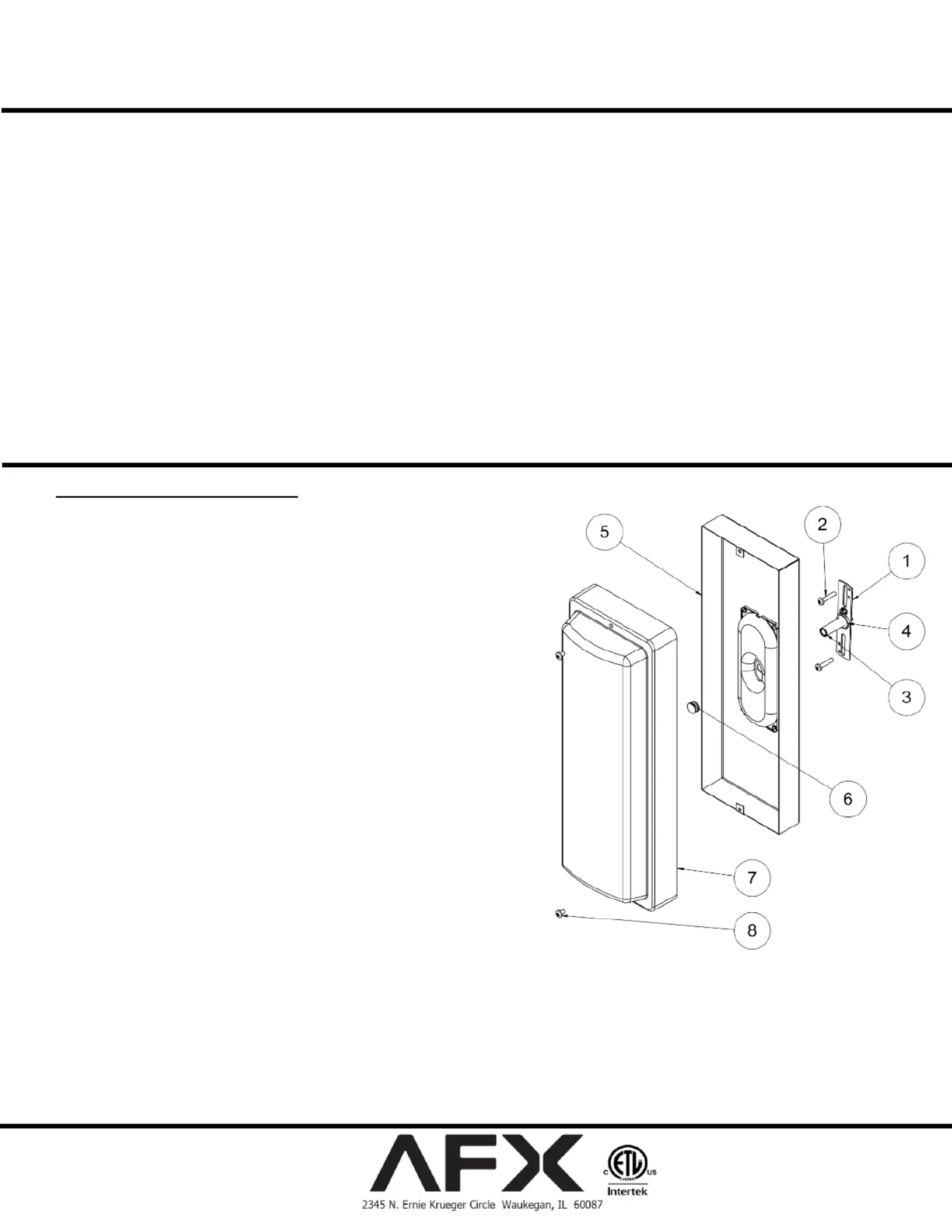
C. Place the diuser assembly (7) and hardware o to the side.
D. Install bracket (1) to junction box (not supplied) with two screws (2) to secure it.
E. Install stem (3) to bracket (1) using washer and jam nut (4) to secure it.
Wiring All wiring must take place inside junction box (not included)
Caution: Make sure power is o at fuse or circuit breaker box. Check power wires for
damage or scrapes. If power supply wires are within three inches of the LED driver,
use wire suitable for at least 90°C (194°F). st dwellings built before 1985 Note: Mo
have supply wire rated to 60°C. Consult a qualied electrician to ensure correct branch
circuit conductor before installing.
Step 2 Wiring xture
A. Make all wire connections to appropriate wire. Secure with wire nuts (provided).
B. Connect the green wire from the xture to the ground wire from supply power source.
C. Connect the black wire from the xture to the black (L) wire from supply power source.
D. Connect the white wire from the xture to the white (N) wire from supply power source.
E. Pull on each wire lead to make sure connections are secure. Make Do not mix wires.
certain no bare wires are exposed outside of wire connectors. Tuck all connections
neatly into junction box.
Step 3 Back pan mounting
A. Install xture housing (5) by aligning center hole to stem (3) then using barrel nut (6) to
secure it.
Step 4 Mounting diuser
A. Install the diuser (7) by aligning two holes on top and bottom to housing (5) then using
two screws (8) to secure it.
Step 5 For wet application
A. Apply a small amount of clear silicone (not included) per manufacturer’s instruction around screws
(8) and around the diuser frame (7) and housing (5)where it contacts with the surface of the wall
on three sides only. Do not caulk on the bottom.
Step 6 Restore power at fuse or circuit breaker box


Produkt Specifikationer

Mærke: AFX
Kategori: Lys
Model: TPWW70050LWH

Har du brug for hjælp?

Hvis du har brug for hjælp til AFX TPWW70050LWH stil et spørgsmål nedenfor, og andre brugere vil svare dig


Lys AFX Manualer

Lys Manualer

Nyeste Lys Manualer

Kichler

Kichler 15005MST Manual

11 December 2025
Robert Abbey

Robert Abbey RR43X Manual

10 December 2025
Dals

Dals MSL10 Manual

10 December 2025
Robert Abbey

Robert Abbey CI21X Manual

10 December 2025
Kichler

Kichler 15079BKT Manual

10 December 2025
Quoizel

Quoizel PCELW8532MBK Manual

10 December 2025
NUVO

NUVO 65/671 Manual

10 December 2025
Dals

Dals LEDDOWNG3-CC Manual

10 December 2025
NUVO

NUVO 62/2641 Manual

10 December 2025