Axxess AXAC-GM1 Manual


Læs gratis den danske manual til Axxess AXAC-GM1 (16 sider) i kategorien Ikke kategoriseret. Denne vejledning er vurderet som hjælpsom af 16 personer og har en gennemsnitlig bedømmelse på 4.5 stjerner ud af 8.5 anmeldelser. Har du et spørgsmål om Axxess AXAC-GM1, eller vil du spørge andre brugere om produktet?

Side 1/16
AXAC-GM1
INSTALLATION INSTRUCTIONS
AxxessInterfaces.com © COPYRIGHT 2025 METRA ELECTRONICS CORPORATION REV. 7/9/25 INSTAXAC-GM1
ATTENTION: With the key out of the ignition,
disconnect the negative battery terminal
before installing this product. Ensure that all
installation connections, especially the air
bag indicator lights, are plugged in before
reconnecting the battery or cycling the ignition
to test this product.
NOTE: Refer also to the instructions included
with the aftermarket radio.
INTERFACE FEATURES
REQUIRED ITEMS
TABLE OF CONTENTS
Configuration .........................................................2
Add-Cam Configuration from AXXESS Updater ...3
Connections ............................................................ 4
LD-GMLVDS-AC ....................................................... 5
Layout .....................................................................6
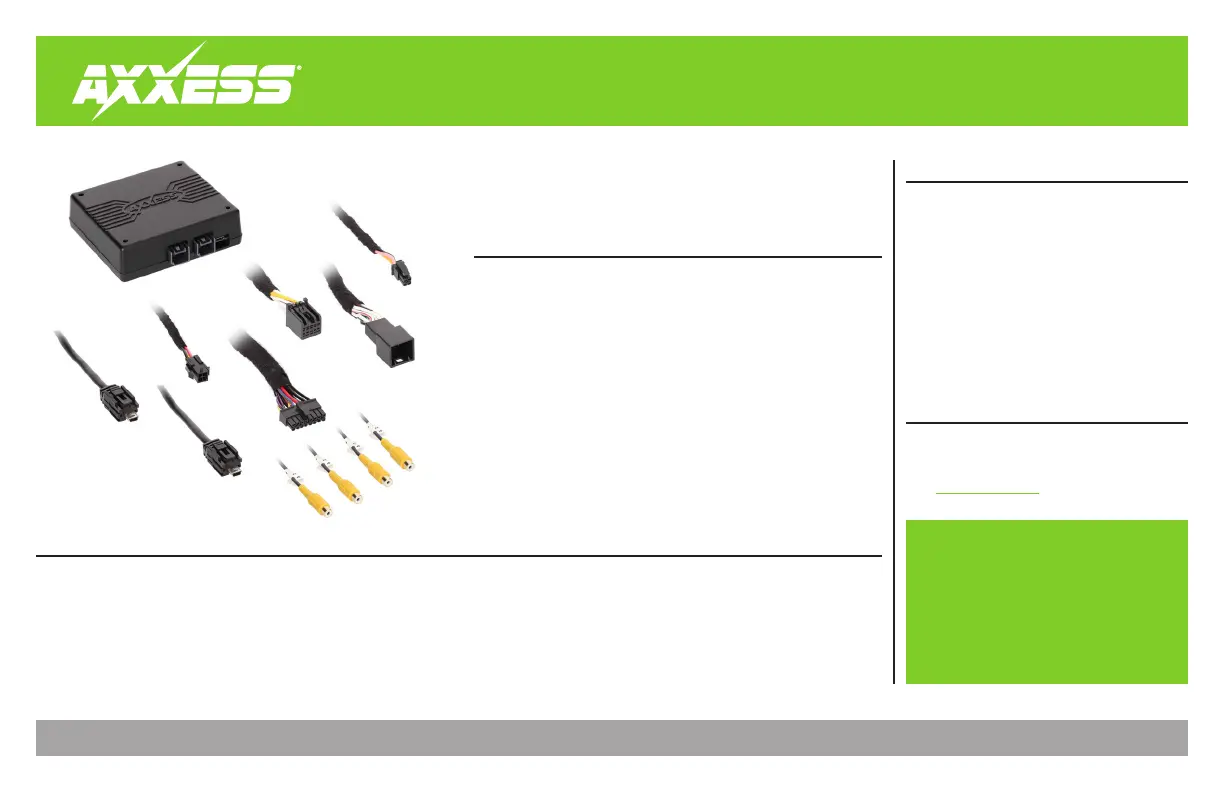
• Add multiple CAN-activated cameras with 4 camera inputs
• Includes AXAC camera interface and vehicle-specific harness
• Programmable 12-volt 5-amp switched output (configured through the
Axxess Updater program)
Reverse signal trigger generated via CAN Bus communication of the vehicle
• Turn signal trigger generated via CAN Bus communication of the vehicle
• 4 programmable camera control wires (configured through the Axxess
Updater program)
Can also be manually controlled and used along with an aftermarket radio
• Rear Video Assistant (RVA) option can be used to keep a camera active
• VSS (Vehicle Speed Sense) input and output
• Micro “B” USB updatable
Update Cable: AXUSB-MCBL (sold separately)
Axxess Updater Program
*Intended for 8" inch screens, the GM LVDS interface will
allow your factory screen to enable a Camera or add
multiple cameras to your factory screen. It can also be used
as a “Baby Monitor” or “Monitor” for your Trailer Hitch”
Camera Data Interface with Pre-Wired Harness
Fits Select Chevrolet/GMC Models*
2015-2020
APPLICATIONS (LD-GMLVDS1-AC - 8 inch (IO5/IO6))
Visit AxxessInterfaces.com for more detailed information
about the product and up-to-date vehicle specific applications.
Chevrolet
w/8” MyLink Touchscreen
Camaro ............................ 2016-2018
Colorado ...........................2017-2018
Equinox ......................................2018
Silverado (LD-Old Style)
........... 2019
Silverado .........................2016-2018
Silverado 2500 / 3500 ............. 2019
Spark ................................ 2016-2018
GMC w/8” MyLink Touchscreen
Acadia ...............................2017-2018
Canyon ..............................2017-2018
Sierra ................................ 2016-2018
Sierra Limited ........................... 2019
Sierra 2500/3500 ..................... 2019
Terrain ........................................2018
Yukon / XL .......................2015-2020


Produkt Specifikationer

Mærke: Axxess
Kategori: Ikke kategoriseret
Model: AXAC-GM1

Har du brug for hjælp?

Hvis du har brug for hjælp til Axxess AXAC-GM1 stil et spørgsmål nedenfor, og andre brugere vil svare dig


Ikke kategoriseret Axxess Manualer
Axxess

Axxess AXEU-MOST25 Manual

9 Oktober 2025
Axxess

Axxess AXBUCH-T1 Manual

9 Oktober 2025
Axxess

Axxess AXSSO-CH Manual

9 Oktober 2025
Axxess

Axxess AXAC-GM1 Manual

8 Oktober 2025
Axxess

Axxess AXDI-6524 Manual

8 Oktober 2025
Axxess

Axxess AX-AB-CH4 Manual

8 Oktober 2025
Axxess

Axxess AXDSPX-FD3 Manual

8 Oktober 2025
Axxess

Axxess AXDSPX-TY4 Manual

8 Oktober 2025
Axxess

Axxess AXDSPX-VW2 Manual

8 Oktober 2025

Ikke kategoriseret Manualer

Nyeste Ikke kategoriseret Manualer