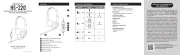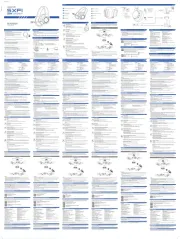
Wireless Bone Conduction Headphones with
Adjustable Bone Conduction Transducers
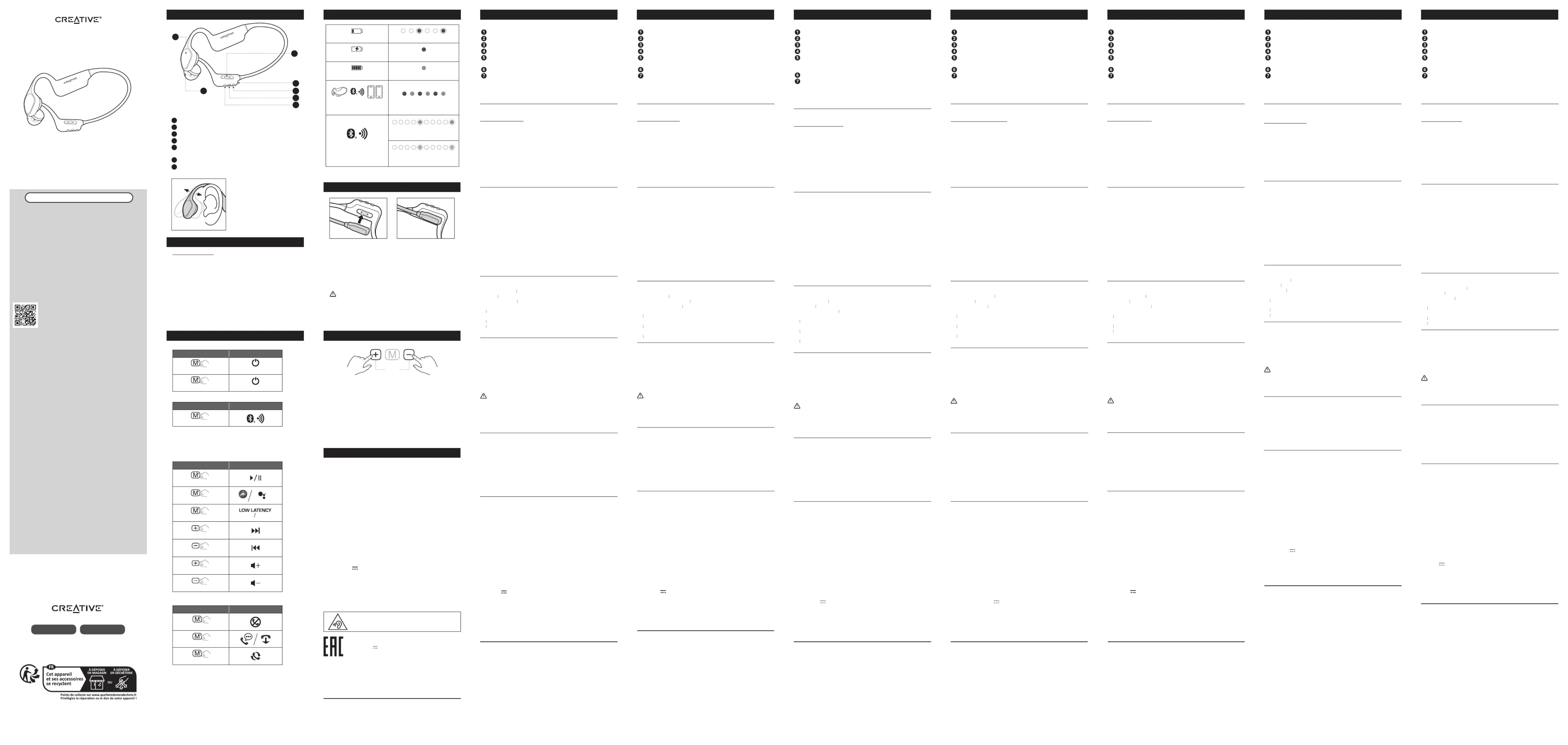
Multifunction Button (Power On / O, Play / Pause, Call /
Connection, Low Latency On / O)
Omni-directional Microphone
1. Disconnect the headphones from the rst mobile device.
The headphones will automatically initiate
pairing upon disconnection
2. On the second mobile device, select the headphones
again from the list of discovered devices to pair
3. Upon successful pairing to the second mobile device,
reconnect the rst mobile device to the headphones to
complete Multipoint Pairing
Multipoint connection is established when the above steps
are performed successfully and
across both mobile devices.
Blinks blue once every 5s
Blinks blue twice every 5s
Solid blueiii) Fully Charged
i) Low Battery Blinks red every 3s
To initiate a Master Reset, enter
then press and hold the Volume + and Volume - buttons for
5s. Upon completion, Ceative Outlier Free+ will play a voice
prompt of “Power O” before powering o.
Master Reset is reserved for cases where users encounter
issues while headphones are in use or during situations
pairing failure, random LED blinking, or
5. Charging Creative Outlier Free+
Ensure that the magnetic charging cable is securely
connected to the headphones’ magnetic charging port
before connecting it to a power source to charge. If the
magnetic charging cable is not secured or if it is connected
incorrectly, remove the cable, and reconnect it to the
headphones. It is essential for the headphones to be
connected securely and properly to the charging cable to
prevent short circuit when there is an active current.
WARNING: Keep the device and charging cable in a well-ventilated area
and away from heat sources and other property, especially when charging.
Unplug the charging cable from the wall power outlet or USB port when the
battery is fully charged or when unused. Leaving it plugged in risks damages to
the battery and / or device.
7. Technical Specications
Headphone Drivers: Bone Conduction Transducers
Frequency Response: 20–20,000 Hz
Microphones: Omni-directional x 1
• A2DP (Advanced Audio Distribution Prole)
• AVRCP (Audio / Video Remote Control Prole)
• HFP (Hands-free Prole)
Operating Frequency: 2402–2480 Hz
Operating Range: Up to 10m / 33 ft
Voice Assistant Support: Siri and Google Assistant
Playtime: Up to 10 Hours*
Charging Interface: USB-A
Battery Type: Rechargeable Lithium-ion Polymer Battery
Operating Temperature: 0–45°C
Maximum RF Output Power: 4 dBm
*Based on moderate volume level. Actual battery life will vary
with use, settings, songs, and environmental conditions
Adjust the bone conduction
experience. The headphones
are capable of delivering
directing the vibrations and
© 2023 Creative Technology Ltd. All rights reserved. Creative, the Creative Logo and Outlier
are trademarks or registered trademarks of Creative Technology Ltd in the United States and/
or other countries. Siri is a trademark of Apple Inc., registered in the U.S. and other countries.
The Bluetooth® word mark and logo are owned by Bluetooth SIG, Inc. and any use of such
marks by Creative Technology Ltd is under license. All other trademarks are the property of their
respective owners and are hereby recognized as such. All specications are subject to change
without notice. Actual product may dier slightly from images shown. Use of this product is
subject to a limited warranty.
Note: Voice Assistant and Low Latency switch can only be
triggered when no audio is playing.
Note: Creative Outlier Free+ will automatically initiate
pairing after powering on. The headphones can
pairing mode when it’s powered o.
Einstellbare Bone-Conduction-Wandler
Magnetischer Ladeanschluss
Multifunktionstaste (Ein/Aus, Wiedergabe/Pause, Anruf/
-Verbindung, Niedrige Latenz ein/aus)
Omnidirektionales Mikrofon
Passen Sie die Bone-Conduction-Wandler an, um ein verbessertes
Knochenleitungserlebnis zu erzielen. Die Kopfhörer sind in der Lage,
eine sattere Klangausgabe zu liefern, indem sie die Vibrationen und
Schallwellen in die bestmögliche Position lenken.
1. Trennen Sie die Kopfhörer von dem ersten mobilen Gerät. Die
Kopfhörer leiten nach dem Trennen der Verbindung automatisch
2. Wählen Sie auf dem zweiten mobilen Gerät die Kopfhörer erneut
aus der Liste der erkannten Geräte zur Kopplung aus.
3. Nach erfolgreicher Kopplung mit dem zweiten Mobilgerät
verbinden Sie das erste Mobilgerät wieder mit den Kopfhörern, um
die Multipoint-Kopplung abzuschließen.
Die Multipoint-Verbindung ist hergestellt, wenn die oben genannten
Schritte erfolgreich durchgeführt wurden und
mobilen Geräten eingeschaltet ist.
i) Schwacher Akku Blinkt alle 3 Sekunden rot
ii) Laden Rotes Dauerlicht
iii) Voll aufgeladen Dauerhaft blau
Kopplung/Multipoint-Konnektivität
Blinkt einmal alle 5 Sekunden blau, wenn Audio abgespielt wird
Blinkt alle 5 Sekunden zweimal blau, wenn kein Ton abgespielt
5. Creative Outlier Free+ auaden
Vergewissern Sie sich, dass das magnetische Ladekabel fest mit dem
magnetischen Ladeanschluss der Kopfhörer verbunden ist, bevor
Sie ihn zum Auaden an eine Stromquelle anschließen. Wenn das
magnetische Ladekabel nicht gesichert oder falsch angeschlossen ist,
entfernen Sie das Kabel und schließen Sie es erneut an die Kopfhörer
an. Es ist wichtig, dass die Kopfhörer sicher und ordnungsgemäß mit
dem Ladekabel verbunden sind, um einen Kurzschluss zu vermeiden,
wenn ein aktiver Strom ießt.
WARNUNG: Bewahren Sie das Gerät und das Ladekabel in einem gut
belüfteten Bereich auf und halten Sie es von Wärmequellen und anderen
Gegenständen fern, insbesondere beim Auaden. Ziehen Sie den Stecker
des Ladekabels aus der Steckdose oder dem USB-Anschluss, wenn der
Akku vollständig aufgeladen ist oder wenn das Gerät nicht benutzt wird.
Wenn Sie es eingesteckt lassen, besteht die Gefahr, dass der Akku und/
oder das Gerät beschädigt werden.
6. Master-Reset („Zurücksetzen“)
Kopplungsmodus auf und halten Sie dann
die Tasten Lautstärke + und Lautstärke - 5 Sekunden lang gedrückt,
um eine Zurücksetzung durchzuführen. Nach Abschluss des Vorgangs
geben die Creative Outlier Free+ die Sprachansage „Ausschalten“
wieder, bevor sie sich ausschalten.
Die Zurücksetzung eignet sich für Fälle, in denen Probleme auftreten,
während die Kopfhörer in Gebrauch sind oder in Situationen wie
-Kopplungsfehler, willkürliches Blinken der LED oder
7. Technische Spezikationen
Kopfhörer-Treiber: Bone-Conduction-Schallköpfe
Frequenzgang: 20-20.000 Hz
Mikrofone: Omnidirektional x 1
• A2DP (Advanced Audio Distribution Prole)
• AVRCP (Audio / Video Remote Control Prole)
• HFP (Hands-free Prole)
Betriebsfrequenz: 2402-2480 Hz
Betriebsreichweite: Bis zu 10 m
Unterstützte Sprachassistenten: Siri und Google Assistant
Spielzeit: Bis zu 10 Stunden*
Schnittstelle zum Auaden: USB-A
Akku: Wiederauadbarer Lithium-Ionen-Polymer-Akku 180 mAh 0,666 Wh
Betriebstemperatur: 0-45 °C
Maximale RF-Ausgangsleistung: 4 dBm
* Basierend auf moderatem Lautstärkepegel. Die tatsächliche
Akkulaufzeit hängt von der Verwendung, den Einstellungen, den
Songs und den Umgebungsbedingungen ab
Transducteurs à conduction osseuse réglables
Port de chargement magnétique
Bouton multifonction (allumer / éteindre, lecture / pause, appel /
, faible latence activée / désactivée)
Microphone omnidirectionnel
Ajustez les transducteurs à conduction osseuse pour proter d’une
expérience améliorée de conduction osseuse. Les écouteurs sont
capables de fournir une sortie sonore plus riche en dirigeant les
vibrations et les ondes sonores vers la position la meilleure possible.
1. Déconnecter les écouteurs du premier appareil mobile. Les
écouteurs lancent automatiquement le jumelage
2. Sur le deuxième appareil mobile, sélectionner à nouveau le casque
dans la liste des dispositifs détectés à jumeler.
3. Une fois le jumelage réussi avec le second appareil mobile,
reconnecter le premier appareil mobile au casque pour terminer le
La connexion multipoint est établie lorsque les étapes ci-dessus sont
eectuées avec succès et que le
iv) Lancer manuellement le jumelage
i) Batterie faible Rouge clignotant toutes les 3 s
ii) Rouge xeEn cours de chargement
iii) Bleu xeEntièrement chargé
/ Connectivité multipoint / Multipoint Connectivity
Rouge et bleu en alternance
Bleu clignotant une fois toutes les 5 s lorsque le son est en cours
Bleu clignotant deux fois toutes les 5 s lorsqu’il n’y a pas de son
5. Chargement du Creative Outlier Free+
S’assurer que le câble de chargement magnétique soit bien connecté
au port de chargement magnétique du casque avant de le connecter
à une source d’alimentation pour le charger. Si le câble de chargement
magnétique n’est pas sécurisé ou s’il est mal connecté, retirer le
câble et le reconnecter au casque. Il est essentiel que le casque soit
solidement et correctement connecté au câble de chargement pour
éviter tout court-circuit en cas de courant actif.
AVERTISSEMENT: Garder l’appareil et le câble de charge dans un
endroit bien ventilé et loin des sources de chaleur et d’autres propriétés,
en particulier lors de la charge. Débrancher le câble de charge de la prise
de courant murale ou du port USB lorsque la batterie est complètement
chargée ou inutilisée. Le laisser branché peut endommager la batterie ou
6. Réinitialisation générale
Pour lancer une réinitialisation générale accéder au mode de
, puis appuyer sur les boutons Volume + et
Volume - et les maintenir enfoncés pendant 5 s. Une fois l’opération
terminée, le Creative Outlier Free+ émet le message vocal d’extinction
« Power O » (extinction) avant de s’éteindre.
La réinitialisation générale est réservée aux cas où les utilisateurs
rencontrent des problèmes lorsque le casque est utilisé ou dans des
situations telles que : échec de jumelage
aléatoire des LED ou pour la réinitialisation de toutes les données.
7. Spécications techniques
Trasduttori a conduzione ossea regolabili
Porta di ricarica magnetica
Pulsante multifunzione (accensione/spegnimento, riproduzione/
pausa, chiamata/connessione
disattivazione bassa latenza)
Microfono omnidirezionale
Regola i trasduttori di conduzione ossea per goderti un’esperienza
di conduzione ossea migliorata. Le cue sono in grado di fornire un
suono più ricco dirigendo le vibrazioni e le onde sonore nella migliore
2.
i)
iv)
i)
iii)
5.
si consiglia di tenere il dispositivo e il cavo di ricarica
in un’area ben ventilata, lontano da fonti di calore e da altri oggetti,
soprattutto durante la ricarica. Scollegare il cavo di ricarica dalla presa di
corrente o dalla porta USB quando la batteria è completamente carica o
quando il dispositivo non viene utilizzato. Lasciare il cavo collegato può
danneggiare la batteria e/o il dispositivo.
6.
Transductores de conducción ósea ajustables
Puerto de carga magnético
Botón multifunción (encendido/apagado, reproducción/pausa,
, baja latencia activada/desactivada)
Micrófono omnidireccional
Ajuste los transductores de conducción ósea para disfrutar de una
mejor experiencia de conducción ósea. Los auriculares son capaces
de ofrecer una salida de sonido más rica al dirigir las vibraciones y las
ondas de sonido a la mejor posición posible.
2.
iv)
i)
iii)
5. +
Mantenga el dispositivo y el cable de carga en un lugar
bien ventilado y alejado de fuentes de calor y otros objetos, especialmente
durante la carga. Desenchufe el cable de carga de la toma de corriente o
del puerto USB cuando la batería esté completamente cargada o cuando
no lo esté utilizando. Si lo deja enchufado, corre el riesgo de dañar la
batería y/o el dispositivo.
7.
Verstelbare beengeleiding transducers
Multifunctionele knop (aan / uit, afspelen / pauzeren, gesprek /
-verbinding, lage latentie aan / uit)
Omnidirectionele microfoon
Pas de beengeleiding transducers aan om te genieten van een
verbeterde beengeleiding ervaring. De koptelefoon is in staat om een
rijker geluid te leveren door de trillingen en geluidsgolven naar de
best mogelijke positie te sturen.
1. Koppel de hoofdtelefoon los van het eerste mobiele apparaat. De
hoofdtelefoon start automatisch de
verbinding wordt verbroken.
2. Op het tweede mobiele apparaat selecteert u de hoofdtelefoon
opnieuw in de lijst met ontdekte apparaten om deze te koppelen.
3. Na geslaagde koppeling met het tweede mobiele apparaat, koppelt
u het eerste mobiele apparaat opnieuw aan op de hoofdtelefoon
om de Multipoint-koppeling te voltooien.
Een multipoint-verbinding is tot stand gebracht wanneer de
bovenstaande stappen geslaagd zijn uitgevoerd en
beide mobiele apparaten is ingeschakeld.
-koppeling handmatig starten
i)
iii)
5.
sla het apparaat en de oplaadkabel op in een
goed geventileerde ruimte en uit de buurt van warmtebronnen en andere
eigendommen, vooral tijdens het opladen. Haal de oplaadkabel uit het
stopcontact of de USB-poort wanneer de accu volledig is opgeladen of
wanneer deze niet wordt gebruikt. De accu en/of het apparaat kunnen
beschadigd raken als u de kabel aangesloten laat.
7.
Säädettävät luunjohtoanturit
ettinen latausportti
Äänenvoimakkuuden lisäyspainike
Monitoimipainike (virta päällä/pois päältä, toisto/tauko, puhelu/
-yhteys, alhainen latenssi päällä/pois päältä)
Äänenvoimakkuuden vähennyspainike
Säädä luunjohtoantureita saadaksesi paremman
luunjohtokokemuksen. Kuulokkeet pystyvät tuottamaan rikkaamman
äänen ohjaamalla värähtelyt ja ääniaallot parhaaseen mahdolliseen
:
i)
ii)
iii)
5. Creative
Säilytä laite ja latauskaapeli hyvin ilmastoidussa tilassa
poissa lämmönlähteiden ja muiden tavaroiden luota erityisesti latauksen
aikana. Irrota latauskaapeli pistorasiasta tai USB-portista, kun akku on
ladattu täyteen tai laturia ei käytetä. Jos jätät laturin kiinni pistorasiaan,
akku ja/tai laite voivat vaurioitua.
Justerbare benledningstransdusere
Multifunksjonell knapp (strøm på / av, spill av / pause, ring /
-tilkobling, lav ventetid på / av)
Juster benledningstransduserne for å oppleve forbedret
benledningsopplevelse. Hodetelefonene er i stand til å levere en
rikere lydutgang ved å rette vibrasjonene og lydbølgene til den beste
i)
5. +
Hold enheten og ladekabelen i et godt ventilert
område og unna varmekilder og annen eiendom, spesielt under
lading. Koble fra ladekabelen fra strømuttaket eller USB-porten
når batteriet er fulladet eller når det ikke er i bruk. Å la det
være koblet til kan føre til skade på batteriet og/eller enheten.
6.
7.
Данное устройство отвечает требованиям Технического регламента
Таможенного союза ТР ТС 020/2011 “Электромагнитная совместимость
технических средств” утв. Решением КТС от 09.12.2011г. №879
ТЕХНИЧЕСКИЙ РЕГЛАМЕНТ Евразийского экономического союза «Об
ограничении применения опасных веществ в изделиях электротехники
и радиоэлектроники» (ТР ЕАЭС 037/2016) ПРИНЯТ Решением Совета
Евразийской экономической комиссии от 18 октября 2016 г. N. 113
Тип устройства: Беспроводная гарнитура
Номер модели, торговая марка: EF1080, Creative
Производитель: Creative Labs Pte. Ltd.
Страна происхождения: Китай
Important Safety Instructions. Do not listen to audio on your
earphones or headphones at high volume for prolonged periods
of time as hearing loss may result.
Please visit for the user guide, safety creative.com/compliance/OutlierFreePlus
and regulatory information and battery removal instruction, which is meant strictly
for independently qualied professional. Please visit creative.com/support/
OutlierFreePlus for all other support related to your product.
[DE] WEITERE INFORMATIONEN
Bitte besuchen Sie für das creative.com/compliance/OutlierFreePlus
Benutzerhandbuch, Sicherheits- und regulatorische Informationen und Anweisungen
zum Entfernen der Batterie, die ausschließlich für unabhängige qualizierte Fachleute
gedacht sind. Bitte besuchen Sie für creative.com/support/OutlierFreePlus
weiteren Support zu Ihrem Produkt.
[FR] INFORMATIONS COMPLÉMENTAIRES
Veuillez consulter le site creative.com/compliance/OutlierFreePlus pour obtenir
le guide d’utilisation, les informations relatives à la sécurité et à la réglementation
et les instructions de retrait de la batterie, qui sont strictement destinés à des
professionnels qualiés indépendants. Veuillez consulter le site creative.com/
support/OutlierFreePlus pour toute autre assistance relative à votre produit.
Visitare la pagina creative.com/compliance/OutlierFreePlus per il manuale utente,
le informazioni su sicurezza e normative e le istruzioni sulla rimozione in sicurezza della
batteria, riservate esclusivamente al personale qualicato esterno. Visitare creative.
com/support/OutlierFreePlus per il supporto relativo al prodotto in uso.
Visite creative.com/compliance/OutlierFreePlus para ver la guía del usuario,
la información de seguridad y reglamentaria y las instrucciones para la extracción
segura de la batería, que están destinadas estrictamente a profesionales cualicados
independientes. Visite para obtener más creative.com/support/OutlierFreePlus
asistencia relacionada con su producto.
Ga naar voor de gebruikershandleiding, creative.com/compliance/OutlierFreePlus
informatie over veiligheid en regelgeving en instructies voor het verwijderen van de
accu, welke uitsluitend bedoeld is voor onafhankelijk gekwaliceerde professionals.
Bezoek creative.com/support/OutlierFreePlus voor alle andere ondersteuning met
betrekking tot uw product.
Besøk creative.com/compliance/OutlierFreePlus for brukerhåndbok, sikkerhets-
og forskriftsinformasjon, og instruksjoner for batterifjerning som er ment for
uavhengige kvaliserte fagpersoner. Besøk creative.com/support/OutlierFreePlus
for all annen støtte relatert til ditt produkt.
Käyttöopas, turvallisuus- ja säädöstiedot ja akun poisto-ohjeet, jotka on tarkoitettu
yksinomaan pätevälle ammattilaiselle, löytyvät sivustolta creative.com/compliance/
Saat lisää tukea tuotteeseesi liittyen sivustolta creative.com/support/
Registering your product ensures you receive the most appropriate service and product support
available. You can register your product at creative.com/register. Please note that your warranty
rights are not dependent on registration.
Creative warrants the included Creative-branded hardware product (the “Product”) against defects
in materials and workmanship (“Defect(s)”) for twelve (12) months (for the European Union,
twenty-four (24) months (excluding all wear and tear), subject to certain exceptions as stated in the
EU Directive 1999/44/EC) from the date of purchase. The Creative Limited Hardware Warranty (the
“Warranty”) does not cover (but not limited to) consumable parts, such as batteries or protective
coatings that, due to their nature, tend to diminish over time; normal wear and tear, accidents or
misuse. You must provide Creative proof of original purchase of the Product by a dated itemized
receipt to be eligible for the Warranty. If a Defect arises and a valid claim is received during the
applicable Warranty Period, Creative will at its sole option, service the Product at no charge using
new or refurbished replacement parts at our sole discretion. Warranty benets are in addition to
rights provided under local consumer laws.
For Australia only: Our goods come with guarantees that cannot be excluded under the Australian
Consumer Law. You are entitled to a replacement or refund for a major failure and for compensation
for any other reasonably foreseeable loss or damage. You are also entitled to have the goods
repaired or replaced if the goods fail to be of acceptable quality and the failure does not amount to
a major failure. Goods presented for repair may be replaced by refurbished goods of the same type
rather than being repaired. Refurbished parts may be used to repair the goods. [Address: Creative
Technology Ltd, 31 International Business Park, #03-01, Singapore 609921. Telephone: +65 6895
4101 (standard international call charges apply.)]
PRODUCT REGISTRATION AND WARRANTY
[DE] PRODUKTREGISTRIERUNG UND GARANTIE
Die vollständigen Bedingungen und detaillierte Informationen über die Garantie nden Sie unter
creative.com/compliance/OutlierFreePlus oder indem Sie den QR-Code scannen.
[FR] ENREGISTREMENT ET GARANTIE DU PRODUIT
Pour obtenir les conditions complètes et des informations détaillées sur la garantie, veuillez consulter le
site suivant ou scanner le code QR.creative.com/compliance/OutlierFreePlus
[IT] REGISTRAZIONE DEL PRODOTTO E GARANZIA
Tutti i termini e le informazioni dettagliate sulla garanzia sono disponibili visitando sul sito creative.
com/compliance/OutlierFreePlus o eseguendo la scansione del codice QR.
[ES] REGISTRO Y GARANTÍA DEL PRODUCTO
Para consultar todas las condiciones y la información detallada sobre la garantía, visite creative.com/
compliance/OutlierFreePlus o escanee el código QR.
[NL] PRODUCTREGISTRATIE EN GARANTIE
Voor de volledige voorwaarden en gedetailleerde garantie-informatie, ga naar creative.com/
compliance/OutlierFreePlus of scan de QR-code.
[PL] REJESTRACJA PRODUKTU I GWARANCJA
Wszystkie warunki gwarancji i szczegółowe informacje o niej można znaleźć pod adresem creative.com/
compliance/OutlierFreePlus. Dostęp do nich można też uzyskać, skanując poniższy kod QR.
[NO] PRODUKTREGISTRERING OG GARANTI
For fullstendige vilkår og detaljert informasjon om garantien, besøk creative.com/compliance/
OutlierFreePlus eller skann QR-koden.
[FI] TUOTTEEN REKISTERÖINTI JA TAKUU
Katso kaikki ehdot ja takuun tarkat tiedot osoitteesta tai creative.com/compliance/OutlierFreePlus
[SV] PRODUKTREGISTRERING OCH GARANTI
För fullständiga villkor och detaljerad information om garantin, besök creative.com/compliance/
OutlierFreePlus eller skanna QR-koden.
[DA] PRODUKTREGISTRERING OG GARANTI
For de fulde vilkår og detaljerede oplysninger om garantien, besøg venligst creative.com/compliance/
OutlierFreePlus eller scan QR-koden.
[CZ] REGISTRACE PRODUKTU A ZÁRUKA
Kompletní podmínky a podrobné informace o záruce najdete na adrese creative.com/compliance/
OutlierFreePlus nebo po naskenování QR kódu.
[SK] REGISTRÁCIA PRODUKTU A ZÁRUKA
Úplné podmienky a podrobné informácie o záruke nájdete na adrese creative.com/compliance/
OutlierFreePlus alebo po naskenovaní kódu QR.
Полные условия и подробную информацию о гарантии можно найти на сайте creative.com/
compliance/OutlierFreePlus (или отсканируйте QR-код).
creative.com/compliance/OutlierFreePlus
creative.com/compliance/OutlierFreePlus
creative.com/compliance/OutlierFreePlus
creative.com/compliance/OutlierFreePlus
Garanti ile ilgili tüm şartlar ve ayrıntılar için lütfen creative.com/compliance/OutlierFreePlus adresini
ziyaret edin veya QR kodunu tarayın.
[EN] For the full terms and detailed information on the Warranty, please
visit creative.com/compliance/OutlierFreePlus, or scan the QR code.
A printed copy is available upon request to Creative Labs, Inc., 1900
McCarthy Boulevard, Suite 103, Milpitas, CA 95035.