Elecom M-XGM10UBWH Manual
Elecom M-XGM10UBWH

Læs gratis den danske manual til Elecom M-XGM10UBWH (2 sider) i kategorien Gå. Denne vejledning er vurderet som hjælpsom af 2 personer og har en gennemsnitlig bedømmelse på 4.7 stjerner ud af 1.5 anmeldelser. Har du et spørgsmål om Elecom M-XGM10UBWH, eller vil du spørge andre brugere om produktet?

Side 1/2
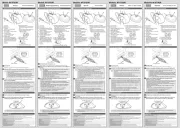
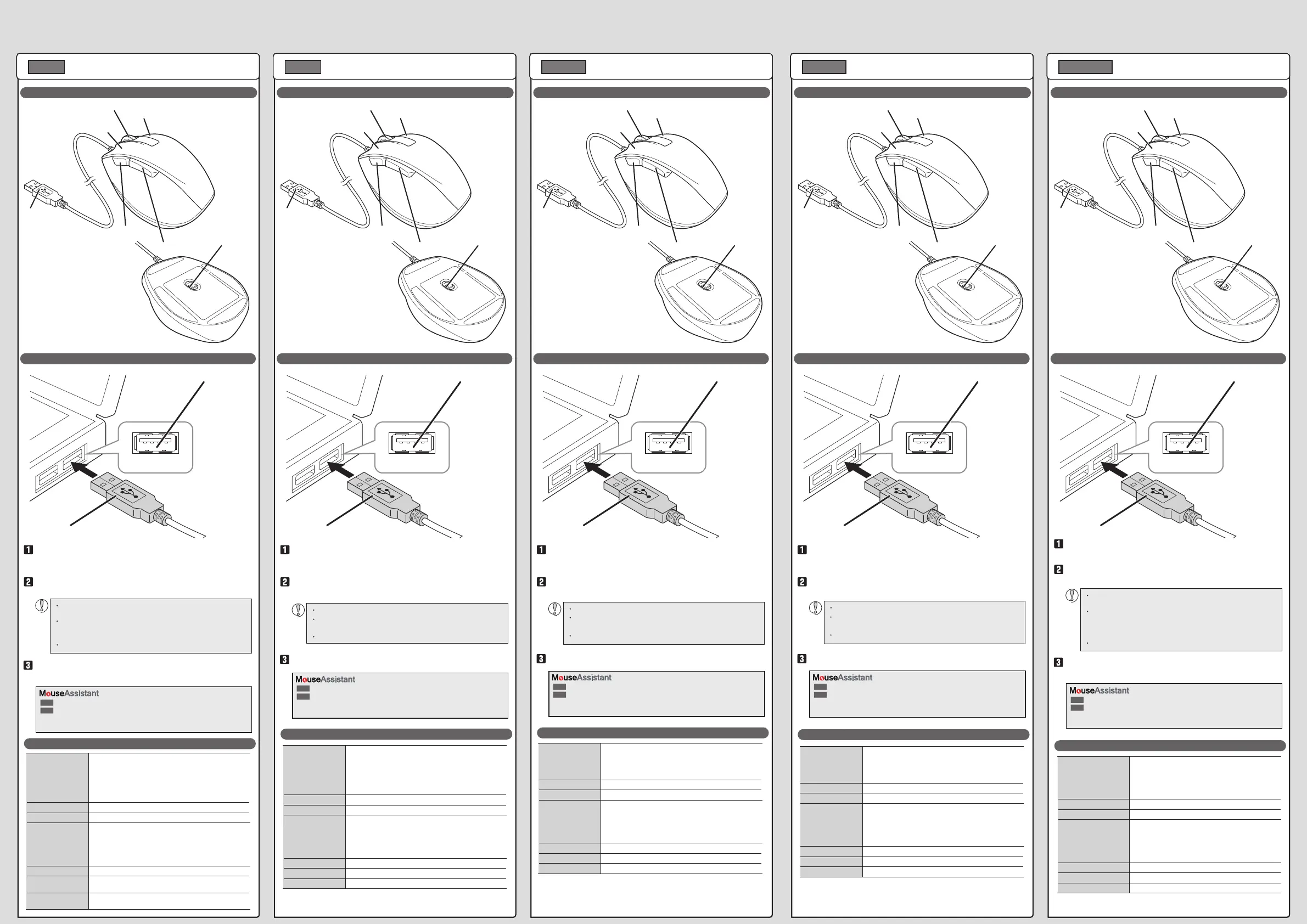
Name and function of each part
USB port
USB connector
Plug in here.
1
2
3
5
6
7
4
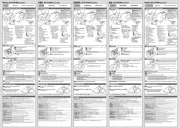
각 부분의 명칭 및 기능
USB 포트
USB 커넥터
이 부분에 끼웁니다.
1
2
3
5
6
7
4
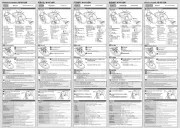
各部分的名称及其作用
USB端口
USB连接器
插入这一部分。
1
2
3
5
6
7
4
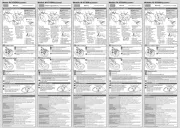
各部位名稱及功能
USB埠
USB連接器
插入此部分。
1
2
3
5
6
7
4
Nama dan fungsi setiap bagian
Port USB
Konektor USB
Colokkan di sini.
1
2
3
5
6
7
4
Download "ELECOM Mouse Assistant" from the ELECOM website to use its button
assignment and high-speed scrolling functions.
https://www.elecom.co.jp/r/132.html
https://www.elecom.co.jp/r/133.html
Mac
Win
엘레컴 웹사이트에서「ELECOM Mouse Assistant」를 다운로드하여 설치하면 버튼 할당이나
고속 스크롤 기능을 사용할 수 있습니다.
https://www.elecom.co.jp/r/132.html
https://www.elecom.co.jp/r/133.html
Mac
Win
从本公司官网下载并安装“ELECOM Mouse Assistant”后,即可使用自定义按键、
高速滚动功能。
https://www.elecom.co.jp/r/132.html
https://www.elecom.co.jp/r/133.html
Mac
Win
在本公司網站下載並安裝「ELECOM Mouse Assistant」,即可使用按鍵配置及高速捲動
等功能。
https://www.elecom.co.jp/r/132.html
https://www.elecom.co.jp/r/133.html
Mac
Win
Unduh "ELECOM Mouse Assistant" dari situs web ELECOM untuk menggunakan fungsi penugasan
tombol dan gulir kecepatan tinggi.
https://www.elecom.co.jp/r/132.html
https://www.elecom.co.jp/r/133.html
Mac
Win
Supported OS Windows
®
10, Windows
®
8.1, Windows
®
RT8.1, Windows
®
7,
macOS Catalina 10.15
(Update for each new version of the OS or the installation of a service
pack might be required.)
* Compatibility information was retrieved during operation confirmation
in our verication environment. There is no guarantee of complete
compatibility with all devices, OS versions, and applications.
Resolution 2000 dpi
Interface USB
Dimensions (W × D × H) M-XGS10UB/M-XGS10UBS
approx. 66 × 92 × 40 (mm)
M-XGM10UB/M-XGM10UBS
approx. 74 × 110 × 41 (mm)
M-XGL10UB/M-XGL10UBS
approx. 82 × 120 × 42 (mm)
Cable length 1.5 m
Operating temperature/
humidity
5°C to 40°C/90%RH or less (without condensation)
Storage temperature/
humidity
-10°C to 60°C/90%RH or less (without condensation)
대응 OS Windows® 10, Windows® 8.1, Windows® RT8.1, Windows® 7,
macOS Catalina 10.15
( 각 OS 의 최신 버전으로의 업데이트나 서비스팩의 설치가 필요할 수
있습니다 .)
* 호환성 정보는 저희 검증 환경에서 작동 확인 시 확인된 것입니다 . 모
든 장치와 OS 버전 및 애플리케이션에서 완전한 호환성이 보장되지
않습니다 .
카운트 수 2000 카운트
대응 인터페이스 USB
외형 치수
( 폭 x 깊이 x 높이 )
M-XGS10UB/M-XGS10UBS
약 66 × 92 × 40 (mm)
M-XGM10UB/M-XGM10UBS
약 74 × 110 × 41 (mm)
M-XGL10UB/M-XGL10UBS
약 82 × 120 × 42 (mm)
케이블 길이 1.5 m
동작 온도/습도 5℃~ 40℃ / ~ 90% RH( , 결로가 없을 때 )
보존 온도/습도 -10℃~ 60℃ / ~ 90% RH(단, 결로가 없을 때 )
支持的操作系统 Windows® 10、Windows® 8.1、Windows® RT8.1、Windows® 7、
macOS Catalina 10.15
(有时需要升级到各操作系统的最新版本,或者安装服务包。
* 兼容性信息是在我们的验证环境中进行操作确认时获取的本公
无法保证该产品与所有设备操作系统版本和应用程序完全兼容
分辨率 2000 DPI
支持接口 USB
外观尺寸(宽 × 深 × 高)M-XGS10UB/M-XGS10UBS
约 66 × 92 × 40 (mm)
M-XGM10UB/M-XGM10UBS
约 74 × 110 × 41 (mm)
M-XGL10UB/M-XGL10UBS
约 82 × 120 × 42 (mm)
连接线长 1.5 m
工作温度/湿度 5℃~ 40℃ ,90%RH(但无结露)
存放温度/湿度 -10℃~ 60℃,90%RH(但无结露)
支援 OS Windows® 10、Windows® 8.1、Windows® RT8.1、Windows® 7、
macOS Catalina 10.15
(可能必須更新至各 OS 的最新版本,或者安裝服務包。)
* 相容性資訊是在本公司的驗證環境中於操作確認時取得。本公司
無法保證該產品與所有裝置、OS 版本和應用程式皆完全相容。
解析度 2000 dpi
適用介面 USB
外型尺寸(寬 × 深 × 高)M-XGS10UB/M-XGS10UBS
約 66 × 92 × 40 (mm)
M-XGM10UB/M-XGM10UBS
約 74 × 110 × 41 (mm)
M-XGL10UB/M-XGL10UBS
約 82 × 120 × 42 (mm)
線長度 1.5 m
動作溫度/濕度 5℃~ 40℃ / ~ 90%RH(必須無水氣凝結)
存放溫度/濕度 -10℃~ 60℃ / ~ 90%RH(必須無水氣凝結)
OS yang didukung Windows® 10, Windows® 8.1, Windows® RT8.1, Windows® 7,
macOS Catalina 10.15
(Mungkin perlu memperbarui OS atau memasang paket layanan.)
* Informasi kompatibilitas diperoleh saat konrmasi pengoperasian
dalam lingkungan verikasi. Kompatibilitas sempurna dengan
semua gawai, Sistem Operasi dan aplikasi tidak dijamin.
Resolusi 2000 dpi
Antar muka USB
Dimensi (L x P x T) M-XGS10UB/M-XGS10UBS
Sekitar 66 × 92 × 40 (mm)
M-XGM10UB/M-XGM10UBS
Sekitar 74 × 110 × 41 (mm)
M-XGL10UB/M-XGL10UBS
Sekitar 82 × 120 × 42 (mm)
Panjang kabel 1,5 m
Suhu operasi/kelembapan Suhu 5°C hingga 40°C/ 90% RH atau kurang (tanpa kondensasi)
Suhu/kelembapan penyimpana Suhu -10°C hingga + 60°C/ 90% RH atau kurang (tanpa kondensasi)
Model:
XGL10UB/M-XGS10UB/M-XGM10UB/M-XGL10UB
M-XGS10UBS/M-XGM10UBS/M-XGL10UBS
모델명:
XGL10UB/M-XGS10UB/M-XGM10UB/M-XGL10UB
M-XGS10UBS/M-XGM10UBS/M-XGL10UBS
设备型号:
XGL10UB/M-XGS10UB/M-XGM10UB/M-XGL10UB
M-XGS10UBS/M-XGM10UBS/M-XGL10UBS
型號:
XGL10UB/M-XGS10UB/M-XGM10UB/M-XGL10UB
M-XGS10UBS/M-XGM10UBS/M-XGL10UBS
Model:
XGL10UB/M-XGS10UB/M-XGM10UB/M-XGL10UB
M-XGS10UBS/M-XGM10UBS/M-XGL10UBS
Wired Mouse
Manual
ENGLISH
Start the PC.
Connecting to a PC
4 "Back" button
Start the PC, and then wait for it to be ready before you start using it.
Any USB port may be used.
Specifications
3 Wheel
You can perform the "Back"
operation in a web browser.
5 "Forward" button
You can perform the "Forward"
operation in a web browser.
6 USB connector (male)
7 Optical sensor
1 Left button
2 Right button
Insert the USB connector of the product into a USB port on the PC.
The driver will be automatically installed, and you will then be able
to use the mouse.
유선 마우스
취급설명서
한국어
컴퓨터를 부팅합니다.
마우스 사용방법
4「뒤로」버튼
컴퓨터를 부팅하고 조작 가능한 상태가 될 때까지 기다리십시오.
어떤 USB 포트에도 사용할 수 있습니다.
기본 사양
3
Web 브라우저에서 「뒤로」 조작이
가능합니다.
5「앞으로」버튼
Web 브라우저에서 「앞으로」 조작이
가능합니다.
6 USB 커넥터(수컷)
7 광학식 센서
1 좌 버튼
2 우 버튼
본 제품의 USB 커넥터를 컴퓨터 USB 포트에 삽입합니다.
드라이버가 자동으로 설치되며, 마우스가 사용 가능하게 됩니다.
有线鼠标
使用说明书
启动计算机。
鼠标的使用方法
4“返回”
启动计算机,在进入可操作状态前,请稍等。
可使用任意一个 USB 端口。
基本规格
3 滚轮
可在网页浏览器上进行返回操作。
5“前进”
可在网页浏览器上进行 前进 操作。
6 USB连接器(公)
7 光学传感器
1 左键
2 右键
将本产品的USB连接器插入计算机的USB端口。
驱动程序将自动安装,自此即可进行使用鼠标。
有線鼠標
使用說明書
開啟電腦。
滑鼠的使用方法
4「上一頁」
啟動電腦,變成能夠操作的狀態之前,請稍候。
USB 埠能夠使用任何一個埠。
基本規格
3 滾輪
可在網頁瀏覽器操作「上一頁」
5「下一頁」
可在網頁瀏覽器操作「下一頁」
6 USB連接器(公)
7 光學式感應器
1 左鍵
2 右鍵
將本產品的USB連接器插入電腦的USB埠。
驅動器自動安裝後,即可使用滑鼠。
Mouse berkabel
Manual
Nyalakan PC.
Menyambungkan ke PC
4 Tombol "kembali"
Nyalakan PC, lalu tunggu hingga siap sebelum Anda mulai menggunakannya.
Setiap port USB dapat digunakan.
Spesikasi dasar
3 Roda
Anda dapat melakukan pengoperasian
"Kembali" dalam browser web.
5 Tombol "maju"
Anda dapat melakukan pengoperasian
"Maju" dalam browser web.
6 Konektor USB (jantan)
7 Sensor optik
1 Tombol kiri
2 Tombol kanan
Masukkan konektor USB produk ke dalam port USB pada PC.
Driver akan otomatis terpasang dan Anda dapat menggunakan
mouse.
中文・简体 中文 ・繁體 Bahasa Indonesia
Be sure to sufficiently check the connector orientation and the
insertion location.
If you feel a strong resistance when inserting the USB connector,
check that the shape and orientation of the connector is correct.
Using excessive force may damage the connector and cause injury.
Do not directly touch the terminal area of the USB connector.
커넥터의 방향과 삽입 위치를 충분히 확인하십시오.
삽입이 잘 안될 경우에는 커넥터 모양과 방향이 올바른지 확인하십시오.
무리하게 밀어 넣으면 커넥터가 손상될 수 있습니다.
USB 커넥터의 단자 부분을 만지지 마십시오.
请仔细确认连接器的方向和插入部位。
插入时感到阻力大时,请确认连接器的形状与方向是否正确。
强行插入可能导致连接器破损或者人身伤害。
请不要触摸USB连接器的端子部。
請充分確認連接器的方向和插入地方。
插入時,若感到強大阻力,請確認連接器的形狀和方向是否正
確。若是強硬插入,連接器可能破損,或者受傷。
請勿觸碰USB連接器的端子部。
Pastikan dengan seksama memeriksa arah konektor dan posisi
pemasangan.
Jika Anda ada sesuatu yang menahan dengan kuat saat memasukkan
konektor USB, periksa apakah bentuk dan arah konektor sudah benar.
Memasukkan konektor secara paksa dapat merusak konektor dan
menyebabkan cedera.
Jangan secara langsung menyentuh area terminal konektor USB.


Produkt Specifikationer

Mærke: Elecom
Kategori:
Model: M-XGM10UBWH
Bredde: 73.8 mm
Dybde: 109.6 mm
Højde: 40.8 mm
Vægt: 92 g
Produktfarve: Hvid
Formfaktor: Højre hånd
Anbefalet brug: PC/Laptop
Strømkilde: Kabel
Kabellængde: 1.5 m
Enhedsgrænseflade: USB Type-A
Bevægelsesdetekteringsteknologi: Optisk
Rulle type: Hjul
Antal knapper: 5
Knapper type: Trykte knapper
Bevægelsesopløsning: 2000 dpi
Programmerbare museknapper: Ja
Antal rullehjul: 1
Fungerer på alle overflader: Ja
Understøttede Windows-operativsystemer: Windows 10, Windows 7, Windows 8.1, Windows Vista
Understøttede Mac-operativsystemer: Mac OS X 10.10 Yosemite, Mac OS X 10.13 High Sierra
Laserfarve: Blå
Muse størrelse: M

Har du brug for hjælp?

Hvis du har brug for hjælp til Elecom M-XGM10UBWH stil et spørgsmål nedenfor, og andre brugere vil svare dig