PAC RadioPRO 4 Manual

PAC Ikke kategoriseret RadioPRO 4
Læs gratis den danske manual til PAC RadioPRO 4 (3 sider) i kategorien Ikke kategoriseret. Denne vejledning er vurderet som hjælpsom af 17 personer og har en gennemsnitlig bedømmelse på 3.7 stjerner ud af 9 anmeldelser. Har du et spørgsmål om PAC RadioPRO 4, eller vil du spørge andre brugere om produktet?

Side 1/3
RP4-GM41
Radio Replacement & Steering Wheel Control Interface
for General Motors Vehicles
Pacic Accessory Corporation
® | Clearwater, Florida 33760 | Ph. 866-931-8021 | support@pac-audio.com
©2015 Pacic Accessory Corporation
www.pac-audio.com
Rev. 012115
C
Introduction & Features
Important Notes
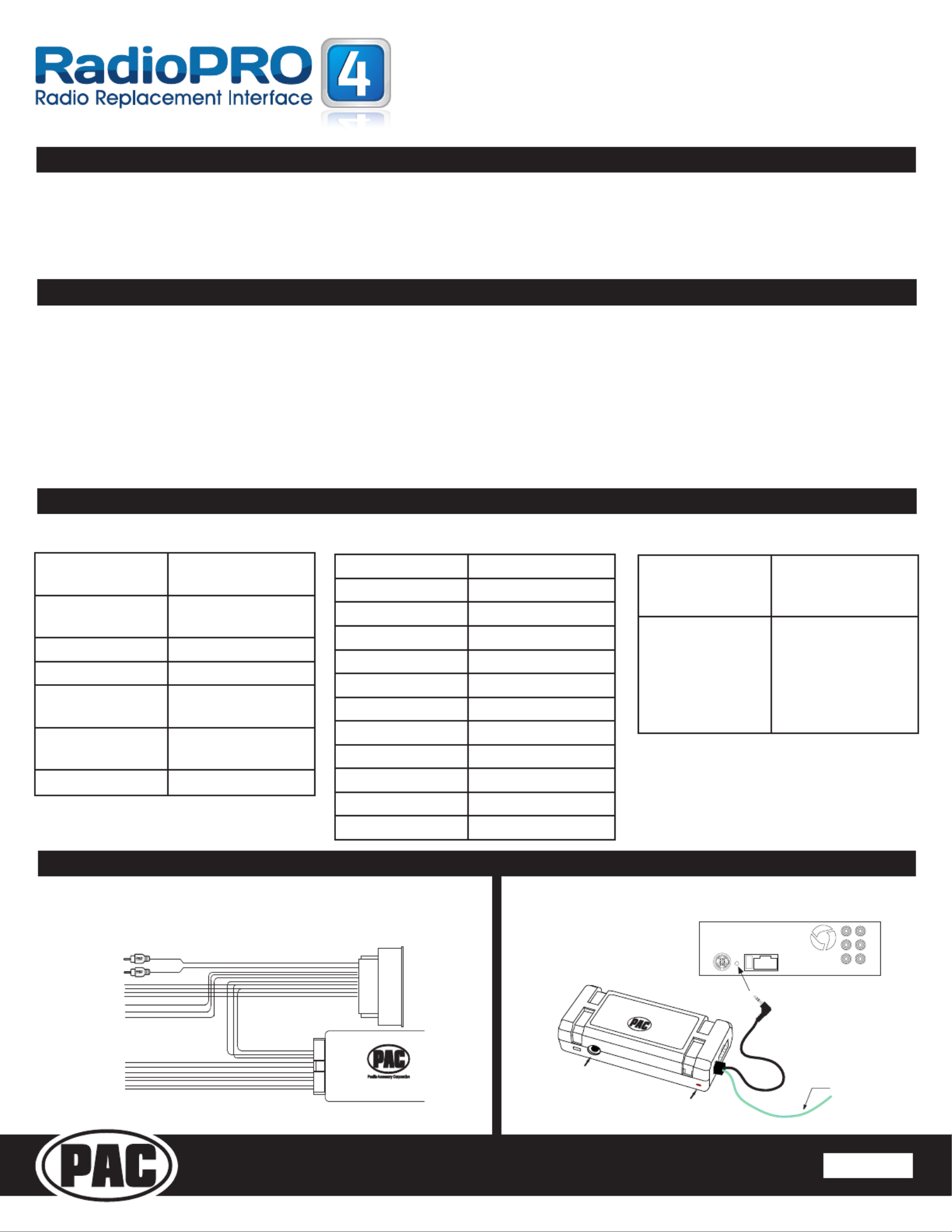
Wiring Connection Chart
Illustration / Schematic
The RP4-GM41 interface allows the replacement of a factory radio in select General Motors vehicles with 29-bit LAN
v2 44-pin connector radios. Using this interface will retain factory features such as steering wheel controls (SWC) &
Warning Chimes when the original radio is removed. Use of this interface also allows you to program two radio functions
to each SWC button by using short press long press dual command functionality. The RP4-GM41 also provides data bus
driven outputs such as retained accessory power (RAP), vehicle speed sensor (VSS), illumination, reverse trigger and
parking brake.
1. Once the radio has been removed, the vehicle settings which are normally selected through the factory radio can be accessed by downloading
and installing the PAC Vehicle Settings program from http://www.pac-audio.com/rmware/RP/index.html. Please make your vehicle
settings selections before removing the factory radio for optimal installation time.
2. The radio select rotary switch on the side of the interface must be adjusted to the proper radio setting before plugging the interface into the
vehicle (see below for setting chart).
3. The interface comes pre-programmed for all of the vehicles factory SWC functions and does not require programming unless you wish to
re-assign the SWC functions or utilize short press long press dual command functionality. The SWC can always be restored to default settings
by pressing and releasing the program button on the side of the interface once and waiting 7 seconds for the LED to ash 4 times.
4. The LED will ash whenever a SWC button is pressed.
5. BAADIN22 antenna adapter sold separately
Red / White Parking Brake
Output (-)
Purple / White Vehicle Speed
Output
Blue Not Used
Blue / White Not Used
Red Accessory Output
(1 amp)
Orange / White Illumination Output
(+)
Green Reverse Output (+)
Interface Connector
Yellow Battery +12v
Black Ground
Blue/White Not Used
White Front L + input
White / Black Front L - input
Grey Front R + input
Grey / Black Front R - input
Green Rear L + input
Green / Black Rear L - input
Purple Rear R + input
Purple / Black Rear R - input
Red/White RCA Factory AUX Jack
Vehicle Connector SWC Connector
Pacific Accessory Corporation
Interface Connector
See above chart for
wire color descriptions.
Vehicle Connector
See above chart for
wire color description.
SWC Connection
See above chart for
different radio type
connections
Acc On/
Programming
LED
Programming
Button
Wiring SWC Connection
Page 1
Blue/Yellow Kenwood, Newer
JVC, OEM or
Blaupunkt
3.5mm Jack Alpine, JVC,
Clarion, Fusion,
Pioneer, Sony,
Valor, Boyo, Dual,
Lightning Audio,
Visteon or Advent


Produkt Specifikationer

Mærke: PAC
Kategori: Ikke kategoriseret
Model: RadioPRO 4

Har du brug for hjælp?

Hvis du har brug for hjælp til PAC RadioPRO 4 stil et spørgsmål nedenfor, og andre brugere vil svare dig


Ikke kategoriseret PAC Manualer
PAC

PAC CAM-GM51 Manual

11 Juli 2025
PAC

PAC TY1A-RS Manual

11 Juli 2025
PAC

PAC SR-F15009HX Manual

10 Juli 2025
PAC

PAC SRK-RAM13HX Manual

10 Juli 2025
PAC

PAC AAI-TY3 Manual

30 Juni 2025
PAC

PAC SRK-GM14HX Manual

10 Marts 2025
PAC

PAC C2A-CHY Manual

19 Februar 2025
PAC

PAC MCI-FD22 Manual

19 Februar 2025
PAC

PAC GM6A-RST Manual

19 Februar 2025
PAC

PAC SWI-X Manual

19 Februar 2025

Ikke kategoriseret Manualer

Nyeste Ikke kategoriseret Manualer

Waterstone

Waterstone 7800 Manual

11 December 2025
Kwikset

Kwikset 258 Manual

11 December 2025
Schlage

Schlage F170 Manual

11 December 2025
Moen

Moen Align 7565EV Manual

11 December 2025
ALNO

ALNO MC10244 Manual

11 December 2025
JET

JET TAK-ZX Manual

11 December 2025
Waterstone

Waterstone 1455 Manual

11 December 2025
Laica

Laica NE2015 Manual

11 December 2025