Adesso WKB-7500CB Manual

Adesso Tastatur WKB-7500CB

Læs gratis den danske manual til Adesso WKB-7500CB (1 sider) i kategorien Tastatur. Denne vejledning er vurderet som hjælpsom af 4 personer og har en gennemsnitlig bedømmelse på 4.9 stjerner ud af 2.5 anmeldelser. Har du et spørgsmål om Adesso WKB-7500CB, eller vil du spørge andre brugere om produktet?

Side 1/1
USB Port
USB Receiver *1 AA battery
*2 AAA batteries
Quick Start Guide
Keyboard and Mouse
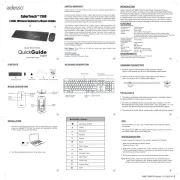
FEATURES
• Platform: Windows® 7/8/10/11 above Mac os 10.4 and above
• Connnectivity Technology: 2.4GHz wireless
REQUIREMENTS
This wireless ergonomic keyboard and mouse combo features responsive scissor-
switch keys for a comfortable, quiet typing experience and a precision mouse for
smooth navigation—perfect for productivity and extended use.
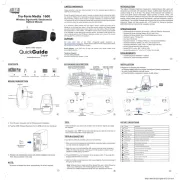
Inserting the batteries
CONTENTS
Pairing method
1. The receiver was paired with keyboard and mouse in advance, below is
1. Remove the battery cover from the mouse and
insert one AA battery and place the cover back on
1. Remove the battery cover from the keyboard and
insert two AAA batteries and place the cover back on
the pairing method in case it needs re-pairing.
a. Turn ON your available device and plug the USB receiver, Turn ON
the keyboard and move it near receiver within 1 foot, press ESC + K,
the LED will blinking when pairing and Stop blinking paired.
b. The same setup for the mouse, except press and hold the middle button
and the right click button for 5 seconds instead.
WKB-7500CB-English
2
3
654
8 97
Home
Backward
Forward
Favorite
Refresh
Multimedia Hotkeys
Previous Track
Next Track
Stop
Play / Pause
Volume Up
Volume Down
Mute
Lock
Microphone
TIPS
When the Battery Low LED is ON, it means that the device requires new batteries
We suggest to turn the devices when leaving your desk for more than an OFF
hour to save battery life for longer lasting use.
TROUBLESHOOTING
If the wireless keyboard / mouse wont work, please try the following:
1. Make sure the Devices have enough power.
Switch the device to ON.
2. Make sure you have connected the USB receiver correctly to the device's
USB ports. Move the devices 1 foot away from the receiver in order to avoid
interference while pairing.
3. Do the pairing process once more according the Pairing method on page 6.
Note: Wireless phone, routers and other devices that uses 2.4GHz frequency,
might cause interference with wireless keyboard and mouse. Please
relocate such wireless applicances away from your keyboard and mouse.
INSTALLATION
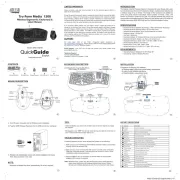
KEYBOARD DESCRIPTION
LIMITED WARRANTY
Adesso provides a one year limited warranty for all of its products against defects in
material and workmanship.
During this period, Adesso will repair or replace any product which proves to be defec-
tive. However, Adesso will not warranty any product which has been subject to improper
freight handling, shipping abuse, neglect, improper installation or unauthorized repair.
The warranty will not cover products installed with components not approved by Adesso
and products where the sealed assembly trace has been broken.
If you discover a defect, Adesso will, at its option, repair or replace the product at no
charge to you provided you return it during the warranty period with freight charges
pre-paid to Adesso. Before returning any product, you must obtain a Return Merchan-
dise Authorization number (RMA). This RMA # must be clearly marked on the outside
of the package you are returning for warranty service. Be certain to also include your
name, shipping address (no PO Boxes), telephone number, and a copy of the invoice
showing proof of purchase in the package.
SUPPORT
We have listed most of our FAQs (Frequently Asked Questions) at: http://www.ades-
so.com/faq.php. Please visit our FAQ Service & Support pages before you contact our
E-mail or Telephone Support.
Email Support: If our FAQs do not help you resolve your issues, please email
support@adesso.com
Telephone Support:
Toll Free: (800) 795-6788
9:00AM to 5:00PM PST Monday - Friday
www.adesso.com
English
QuickGuide
Model: WKB-7500CB
WKB-7500CB
Wireless Ergonomic Scissor Switch Keyboard
and Mouse Combo
1
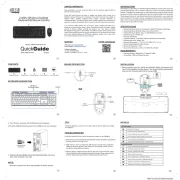
MOUSE DESCRIPTION
1. Turn ON your computer and plug in the USB receiver into your computer
or devices available USB port. The system will automatically load the
USB receivers plug and play feature.
2. T N urn O your keyboard and mouse, it will be ready to use.
USB Receiver
Key Layout:
Tracking Method:
Connectivity:
Range:
DPI Resolution:
Buttons:
Hand Orientation:
Battery:
Dimensions:
Weight:
Connection:
Working Range:
Battery:
Hotkeys
104-Key US Layout
Optical Sensor
2.4Ghz RF
30 ft (10m)
3 levels 800/1200/1600
6 buttons (left & right click, back & forward, DPI switch
scroll wheel, middle button)
Right
AA battery
4.7 ” x 3.1” x 1.7” (120 x 80 x 42 mm)
0.2 lb (80g)
2.4Ghz
30 Feet (10m)
AAA*2
14 hotkeys (Home, Back, Forward, Favorite, Refresh, Play/Pause
Stop, Rewind, Fast forward, Volume +, Volume -, Mute, Microphone, Lock)
18.1” x 9.1“ x 1.3” (460 x 232 p1-x3 4mm)
2.2 lbs (1000g)
Mouse Specications:
Keyboard Specications:
Keyboard Dimensions:
Keyboard Weight:
Launches CoPilot
Optional
Win Key
Command
Alt Key
Command
Alt Key
LED Indicator
Numlock/Capslock/Scroll lock/Low Battery
Shortcut Keys Shortcut Keys
Copilot AI hotkey
www.adesso.com
English
QuickGuide
Model: WKB-7500CB
WKB-7500CB
Wireless Ergonomic Scissor Switch Keyboard
and Mouse Combo
1
D
Right Click
Left Click
Middle/Scroll
Button
DPI Switch
Back Button
Forward
Button
AA
AAA
AAA
AAA Battery
AAA Battery
AA
G
R
#
7
0
9
8
^
6
5
4
@
1
!
PrtSc
SysRq
Scroll Pause
Break
Lock
Home PgUp
PgDn
7
8 9
6
5
4
1
End
Ins
Enter
0
Del
Insert
Page
Up
Page
Down
Home
EndDelete
9
Clear
opt
cmd
Alt
cmd
Alt
A


Produkt Specifikationer

Mærke: Adesso
Kategori: Tastatur
Model: WKB-7500CB

Har du brug for hjælp?

Hvis du har brug for hjælp til Adesso WKB-7500CB stil et spørgsmål nedenfor, og andre brugere vil svare dig